Script docs
Whiteboards
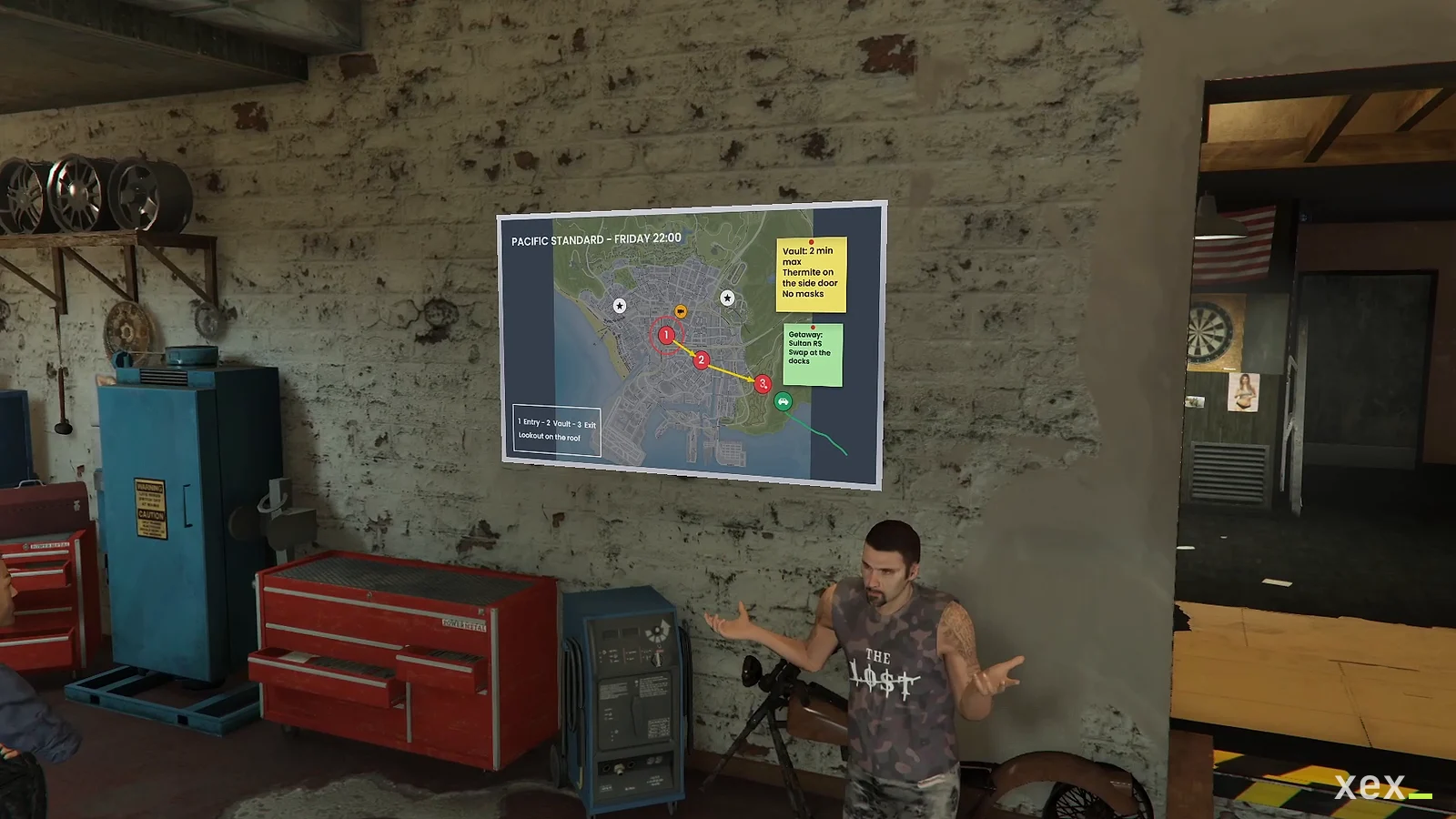
Whiteboards on any wall for heist plans, police briefings, classes and investigations, drawn live for the whole room.
- Version
- v1.0.0
- Frameworks
- ESX · QBCore · Qbox
- Requires
- ox_lib, oxmysql, ox_target or qb-target, OneSync
- Source
- Escrow
- Updated
- 20 Nov 2026
Whiteboards for FiveM. Put a board on any wall, choose who can write on it, and players draw, write, drop tactical icons and pin images on it while everyone in the room watches the plan take shape. For gang HQs, police briefing rooms, classrooms, businesses or a heist crew’s garage. ESX, QBCore and Qbox.
The board is painted straight onto the wall: no props, no texture replacement and no streamed assets.
Made by XeX. Screenshots and the rest of the XeX scripts are on xexstudio.com.
Features
- Any wall: aim at a wall, size the board with the mouse wheel and press E. A rectangle shows where it will go: green when it fits, red when it hangs past the wall (a doorway, a window, a corner), when something is in the way (a lamp, a pipe, a shelf) or when it would cover another board.
- Portable boards: players use the whiteboard item, hang it on a wall and choose who writes on it: their job, their gang, only themselves or everyone. They take it down from the board and get the item back. Limit per character in the config.
- Admin boards: placed with a command for police stations, schools or HQs, and saved across restarts.
- Owners with grades:
police:3lets sergeants and above write while recruits can only look. Anyone nearby can look at a board up close. - Plan on the map: arrows, lines, boxes and circles, and tactical icons (numbered pins that count up on their own, vehicle, weapon, police, camera, cross, flag, target, building, money) over a city map or the full map.
- Briefings with pages: up to 6 pages per board. The page open in the editor is the one on the wall, so flipping pages (or the arrow keys) presents a briefing to the whole room. Viewers follow the presenter.
- Laser pointer: whoever holds the board points at it and everyone in the room sees the red dot live, on the wall and in the close-up view.
- Sticky notes and corkboard: coloured notes with up to 8 lines, and a cork background for investigation boards.
- Editor: marker in ten colours, eraser, shapes, icons, sticky notes, text, images from a link, move any item, edit any text or note, remove one, undo, redo and clear. Six backgrounds: whiteboard, green and black chalkboards, cork, a city map and the full map.
- Version history: the last versions of every board are kept, so an admin can undo vandalism in two clicks.
- Live: the editor saves on its own a few seconds after each change, and every player in range sees it.
- One writer at a time: a lock on the server, released when the writer closes the editor, disconnects, goes down or stays idle for too long.
- Validated on the server: every save is checked again (items, points, texts, colours, size), and images must come from an allowed host and be a PNG, JPG or WebP under the size limit.
- Optimized: only the two closest boards in range are rendered, and their pages are reused. The pointer only repaints the wall page, never the drawing.
- Instanced houses: a board belongs to the routing bucket it was hung in, so a board inside one apartment never shows up in another one built on the same spot.
- Exports for other resources to own boards (a gang HQ that moves, a business that changes hands).
- English and Spanish.
Requirements
- ox_lib and oxmysql
- One framework: ESX, QBCore or Qbox
- ox_target or qb-target
- For portable boards: ox_inventory, qb-inventory or the ESX inventory
- OneSync (on by default on current servers)
Install
- Put
xex_whiteboardsin your resources folder. - Add it to
server.cfgafter your framework, ox_lib, oxmysql and your target resource:ensure xex_whiteboards - Set the language with
setr ox:locale en(ores). - For portable boards, add the
whiteboarditem:- ox_inventory: copy
install/ox_inventory.luaintoox_inventory/data/items.lua. - qb-inventory: copy
install/qb-inventory.luaintoqb-core/shared/items.lua. - ESX inventory: run the item line at the end of
install/whiteboards.sql. - Picture: copy
install/images/whiteboard.pngtoox_inventory/web/images/(orqb-inventory/html/images/).
- ox_inventory: copy
The tables are created on start. If your database user can’t create tables, run install/whiteboards.sql.
Admin
| Command | What it does |
|---|---|
/whiteboard add |
Place a board: aim at a wall, mouse wheel for size, E to place, then a name and the owners |
/whiteboard remove [id] |
Remove the closest board (or that id) and its content |
/whiteboard clear [id] |
Wipe what is written on the closest board (or that id) |
/whiteboard history [id] |
Previous versions of the closest board (or that id), to restore one |
/whiteboard list |
List every board with its owners and position |
The command is restricted to Config.Admin.ace (group.admin). The owners are picked from your server’s own jobs
(and gangs on QBCore and Qbox), with an optional minimum grade, and any other name can be typed (police:3 = grade 3
or higher), for gangs that live in another resource. On ESX the job is used; on QBCore and Qbox both the job and the
gang count. remove also works on portable boards (the item is not given back).
Images
Players paste an https link. The server only accepts hosts listed in Config.Images.hosts (i.postimg.cc and
i.ibb.co by default), and asks the host for the file type and size before the image can be placed. Discord links
expire and imgur does not load inside FiveM, so neither is listed. Set Config.Images.enabled = false to turn
images off.
For developers
Boards placed by admins are saved by this resource. Other resources can own boards instead, for example one per gang HQ that moves with the gang:
-- server
exports.xex_whiteboards:SetBoard('gang:ballas', {
    owners = { 'ballas' },            -- or job = 'ballas'; empty = everyone
    label = 'Ballas plans',
    coords = { x = 0.0, y = 0.0, z = 0.0 },
    heading = 90.0,                   -- where the face looks, away from the wall
    width = 2.2,
    bucket = 0,                       -- routing bucket (optional, 0 by default)
})
exports.xex_whiteboards:SetBoard('gang:ballas', nil)   -- take it off the wall (content is kept)
exports.xex_whiteboards:ClearBoard('gang:ballas')      -- wipe the content (new owner)
exports.xex_whiteboards:GetBoard('gang:ballas')

-- client: let your own admin menu place it, then send the result to the server
local spot = exports.xex_whiteboards:PlaceBoard()      -- { x, y, z, heading, width } or nil
Boards registered this way are not saved by xex_whiteboards: register them again when your resource starts and
when xex_whiteboards starts (onServerResourceStart). Ids may use letters, numbers, _, - and :; placed:
is taken by the admin boards.
bridge/server.lua and bridge/client.lua are open: change GetGroups there if your server decides ownership in
another way (grades, a custom gang resource).
Configuration
Everything is in config.lua: the editor’s accent colour, canvas size, board size range, render distance and number of active boards,
edit and view distances, lock time, content limits (pages included), shapes and icons, note colours, the laser
pointer, backgrounds, colours, image hosts, portable boards (item, limit per character, “only me” boards) and how
many versions are kept.
Keys in the editor
| Key | What it does |
|---|---|
| Ctrl+Z / Ctrl+Y | Undo / redo |
| ← → (or Page Up / Down) | Previous / next page (in the editor, also on the wall) |
| Enter | Finish a text |
| Ctrl+Enter or Esc | Finish a sticky note |
| Esc | Close (saves first) |