Script docs
Pause Menu
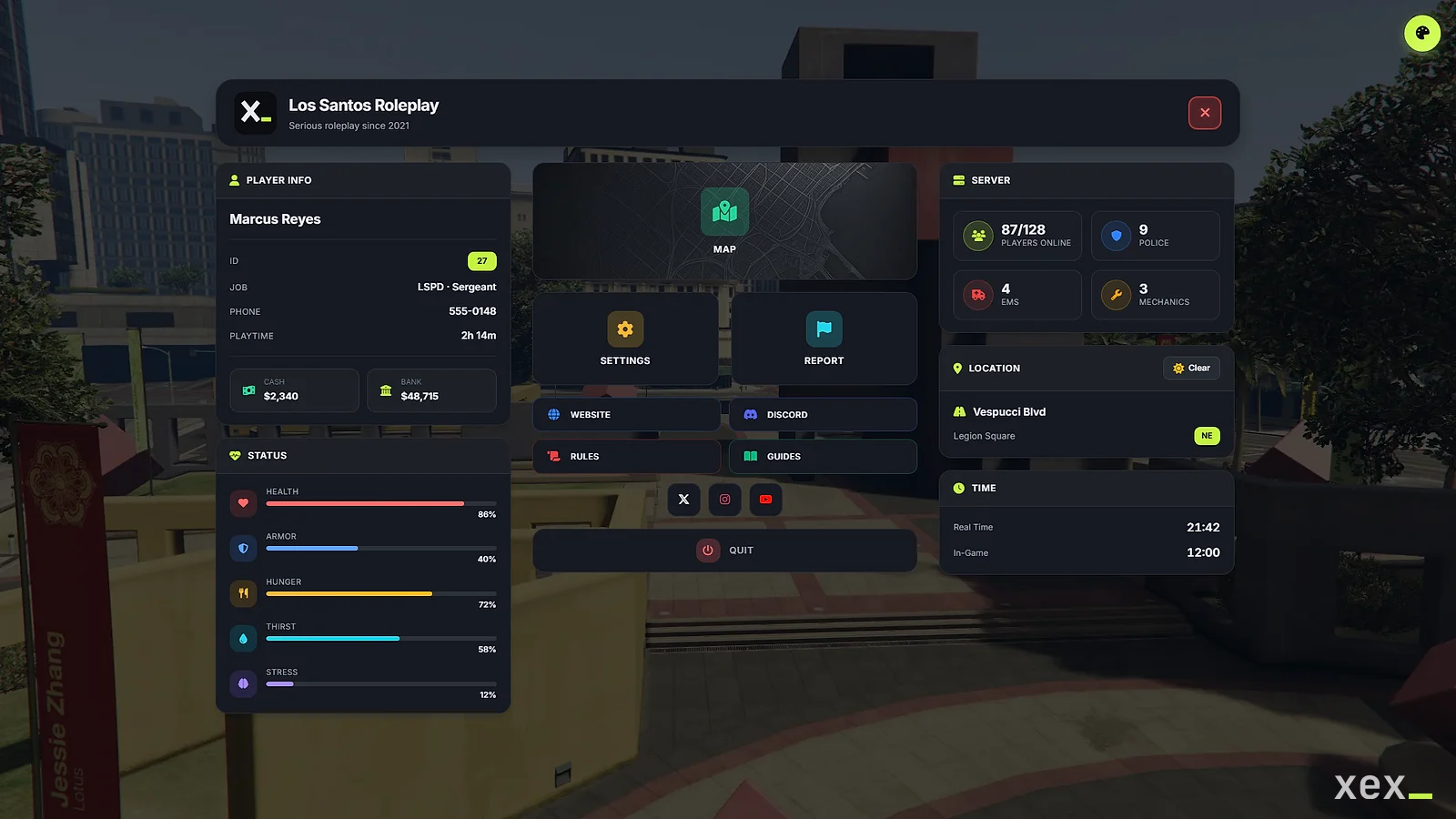
A full replacement for the ESC menu that players can arrange and theme themselves.
- Version
- v2.1.2
- Frameworks
- ESX · QBCore · Qbox
- Source
- Escrow
- resmon
- 0.01 ms idle · 0.01 ms menu open
- Updated
- 10 Oct 2026
Overview
XeX Pause Menu replaces the native ESC menu with a configurable dashboard for ESX, QBCore and Qbox. Server owners choose the defaults; every player can rearrange the cards and pick a theme that is saved to their profile.
Supported Frameworks
| Framework | Version | Status |
|---|---|---|
| ESX Legacy | 1.6.0+ | ✅ Full Support |
| QBCore | Latest | ✅ Full Support |
| QBox | Latest | ✅ Full Support |
Features Summary
Core Features
| Category | Feature | Description |
|---|---|---|
| UI | Adjustable transparency | Players choose card and background opacity |
| UI | 10 base themes + 12 color presets | Themes: Dark, Light, Glass, Midnight, Emerald, Sunset, Rose, Ocean, Gold, Neon |
| UI | Responsive | Supports 1080p to 4K resolutions |
| Customizer | Drag & Drop | Reposition cards freely |
| Customizer | Color Pickers | Full color customization |
| Customizer | UI Scale | 70% - 130% scaling |
| Customizer | Presets | Save/Load/Export/Import custom presets |
| Customizer | Per-Player | Settings saved per player |
| Info | Player Stats | HP, Armor, Hunger, Thirst, Stress |
| Info | Vehicle Info | Model, Plate, Fuel, Speed, Engine |
| Info | Location | Street, Zone, Heading, Coords (admin) |
| Info | Weather | Weather icon and name (in DateTime card) |
| Info | Time | Real time + In-game time |
| Info | Server | Online players, Job counts |
| Info | Money | Cash, Bank, Crypto, Dirty Money |
| Social | Custom Links | Website, Discord, Rules, Guides |
| Social | Social Media | Twitter, Instagram, YouTube, TikTok, Twitch |
| Reports | Categories | Bug, Player, Support, Suggestion |
| Reports | Discord Webhook | Automatic Discord integration |
| Reports | Admin Notifications | In-game alerts to admins |
| Framework | Multi-Framework | ESX, QBCore, QBox with auto-detection |
| I18n | 12 Languages | EN, ES, PT, FR, DE, IT, PL, NL, TR, ZH, RU, AR |
| Performance | Optimized | 0.00ms when closed |
| Updater | Auto-Update Check | Notifies of new versions |
Installation
Requirements
- FiveM Server Build 5181+
- OneSync Enabled
- Framework: ESX Legacy, QBCore, or QBox
- Optional: ox_lib (for enhanced notifications)
Quick Start
1. Extract to your resources folder
2. Rename folder to 'xex_pausemenu' if needed
3. Add to server.cfg:
   ensure xex_pausemenu
4. Configure config.lua
5. Configure svconfig.lua (webhooks, tracked jobs)
6. Restart server
Recommended Resource Order
# server.cfg
ensure oxmysql
ensure ox_lib          # Optional but recommended
ensure es_extended     # or qb-core / qbox
ensure xex_pausemenu
Configuration
Framework Settings
-- config.lua
Config.Framework = 'auto' -- 'auto' | 'esx' | 'qb' | 'qbox'
Config.AutoDetectOrder = {'qbox', 'qb', 'esx'}| Value | Behavior |
|---|---|
'auto' |
Detects framework automatically (recommended) |
'esx' |
Force ESX Legacy |
'qb' |
Force QBCore |
'qbox' |
Force QBox |
Keybind Settings
Config.Keybind = 'ESC'         -- 'ESC' | 'F1'-'F10' | 'NONE'
Config.OpenCommand = 'pausemenu' -- Command to open (nil to disable)| Keybind | Behavior |
|---|---|
'ESC' |
Replaces native pause menu completely |
'F1'-'F3', 'F5'-'F10' |
Opens with F-key, ESC still opens native |
'NONE' |
Only command works |
Server Information
Config.ServerName = 'Your Server Name'
Config.ServerLogo = 'img/logo.svg' -- Path relative to web/ folder, or nil
Config.ServerSlogan = 'The best roleplay experience'
Display Options
Player Information
Config.ShowPlayerInfo = {
    name = true,         -- Character name
    id = true,           -- Server ID
    job = true,          -- Current job + grade
    gang = true,         -- Gang (QB/QBox only)
    phoneNumber = true,  -- Phone number (auto-detected)
    money = true,        -- Cash, Bank, Crypto, Dirty Money
    playTime = true,     -- Session time
}
Phone Number Auto-Detection:
- qs-smartphone
- lb-phone
- npwd
- gcphone
- gksphone
- roadphone
- high-phone
- yflip-phone
- d-phone
- renewed-phone
- QB/QBox charinfo.phone (fallback)
Note:
high-phone,yflip-phone, andd-phoneare detected as running phone resources but their phone number retrieval exports are not yet implemented — the phone number may show as unavailable for these resources.
Server Information
Config.ShowServerInfo = {
    onlinePlayers = true,  -- Current/Max players
    maxPlayers = true,
    policeCount = true,    -- Jobs are configured in svconfig.lua
    emsCount = true,
    mechanicCount = true,
}
Player Stats
Config.ShowPlayerStats = {
    enabled = true,
    health = true,
    armor = true,
    hunger = true,    -- Requires esx_status (ESX) or built-in (QB)
    thirst = true,
    stress = true,    -- QB/QBox only
}
Vehicle Information
Config.ShowVehicleInfo = {
    enabled = true,
    model = true,
    plate = true,
    fuel = true,      -- Auto-detects fuel resource
    speed = true,
    engine = true,
}
Fuel Resource Auto-Detection:
- ox_fuel
- LegacyFuel
- ps-fuel
- cdn-fuel
- okokGasStation
- lj-fuel
- Native fallback
Location
Config.ShowLocation = {
    enabled = true,
    streetName = true,
    zoneName = true,
    heading = true,        -- N, NE, E, SE, S, SW, W, NW
    coords = false,        -- X, Y, Z (always visible for admins)
}
Date/Time
Config.ShowDateTime = {
    enabled = true,
    realTime = true,
    inGameTime = true,
    weather = true,
}
Menu Buttons
Config.Buttons = {
    map = true,       -- Opens GTA map
    settings = true,  -- Opens customizer
    report = true,    -- Opens report modal
}
Social Links
Config.SocialLinks = {
    enabled = true,

    -- Main action buttons
    mainLinks = {
        {
            id = 'website',
            label = 'WEBSITE',
            icon = 'globe',       -- FontAwesome icon name
            url = 'https://your-server.com',
            enabled = true,
            color = '#3B82F6'
        },
        {
            id = 'discord',
            label = 'DISCORD',
            icon = 'discord',
            url = 'https://discord.gg/your-server',
            enabled = true,
            color = '#5865F2'
        },
        {
            id = 'rules',
            label = 'RULES',
            icon = 'scroll',
            url = 'https://your-server.com/rules',
            enabled = true,
            color = '#EF4444'
        },
        {
            id = 'guides',
            label = 'GUIDES',
            icon = 'book-open',
            url = 'https://your-server.com/guides',
            enabled = true,
            color = '#10B981'
        },
    },

    -- Social media icons (bottom row)
    socialMedia = {
        {id = 'twitter', icon = 'twitter', url = 'https://twitter.com/...', enabled = true, color = '#FFFFFF'},
        {id = 'instagram', icon = 'instagram', url = 'https://instagram.com/...', enabled = true, color = '#E4405F'},
        {id = 'youtube', icon = 'youtube', url = 'https://youtube.com/...', enabled = true, color = '#FF0000'},
        {id = 'tiktok', icon = 'tiktok', url = 'https://tiktok.com/...', enabled = false, color = '#FFFFFF'},
        {id = 'twitch', icon = 'twitch', url = 'https://twitch.tv/...', enabled = false, color = '#9146FF'},
    }
}
Available Icons:
- Main:
globe,discord,scroll,book-open,link,gamepad,headset,store - Social:
twitter,instagram,youtube,tiktok,twitch,facebook
Report System
Config.ReportSystem = {
    enabled = true,
    categories = {
        {id = 'bug', label = '🐛 Bug Report', color = '#F59E0B'},
        {id = 'player', label = '👤 Player Report', color = '#EF4444'},
        {id = 'support', label = '❓ Support Request', color = '#3B82F6'},
        {id = 'suggestion', label = '💡 Suggestion', color = '#10B981'},
    },
    minMessageLength = 20,    -- Minimum characters
    maxSubjectLength = 100,   -- Maximum subject length (checked on the server)
    maxMessageLength = 1000,  -- Maximum message length (checked on the server)
    cooldown = 60,            -- Seconds between reports
    notifyAdmins = true,      -- In-game notification to admins
    sendToDiscord = true,     -- Send to webhook
}
Disconnect Options
Config.Disconnect = {
    showConfirmation = true,
    leaveMessage = 'Thanks for playing! See you soon! 👋',
    options = {
        disconnect = true,      -- Disconnect from server
        quitGame = true,        -- Close FiveM
        characterSelect = true, -- Return to character selection
    }
}
UI Customization
Config.UI = {
    accentColor = '#C5F24A',  -- Brand color: accent of the Default preset
    buttonImages = {          -- Faint background of these buttons: path relative to web/, URL, or false
        map = 'img/buttons/map.webp',
        settings = false,
        report = false,
    },
    sounds = {
        enabled = true,
        open = true,
        close = true,
        hover = true,
        click = true,
    },
    hideRadar = true,         -- Hide minimap when open
    showOverlay = true,       -- Dark overlay behind menu
    overlayOpacity = 0.7,     -- 0.0 - 1.0
    enableCustomizer = true,  -- Allow player customization
}
Customizer Options
Control what players can customize:
Config.CustomizerOptions = {
    -- Enable/disable entire tabs
    tabs = {
        theme = true,    -- Theme, background, animations
        colors = true,   -- Color customization
        layout = true,   -- Drag & drop, visibility
        cards = true,    -- Card styles
        presets = true,  -- Save/load presets
    },

    -- Theme tab
    theme = {
        baseTheme = true,         -- Theme selection
        backgroundOpacity = true, -- Overlay opacity
        backgroundImage = true,   -- Custom background
        cardOpacity = true,       -- Card transparency
        animations = true,        -- Enable/disable
        displayMode = true,       -- Fullscreen/Boxed
        uiScale = true,           -- Scale slider
    },

    -- Colors tab
    colors = {
        mainColors = true,        -- Primary, Secondary, Accent
        backgroundColors = true,  -- Background colors
        textColors = true,        -- Text colors
        statusBarColors = true,   -- HP, Armor, etc.
        jobColors = true,         -- Police, EMS, Mechanic
    },

    -- Layout tab
    layout = {
        editMode = true,          -- Drag & drop
        cardVisibility = true,    -- Show/hide cards
        columnLayout = true,      -- Column count
        resetPositions = true,    -- Reset button
    },

    -- Cards tab
    cards = {
        cardStyle = true,         -- Glass, Solid, Minimal, Neon
        borderRadius = true,      -- Corner rounding
        cardSpacing = true,       -- Gap between cards
    },

    -- Presets tab
    presets = {
        themePresets = true,      -- Built-in presets
        savePreset = true,        -- Save custom
        importExport = true,      -- Import/Export JSON
    },
}
Admin Features
Config.Admin = {
    showAdminBadge = true,       -- Badge next to admin names
    showCoordsForAdmins = true,  -- Coordinates visible
}
Who counts as admin is configured in svconfig.lua (see Admin Detection).
Performance Options
Config.Performance = {
    updateInterval = 1000,         -- Update frequency (ms)
    cachePlayerData = true,        -- Enable caching
    cacheDuration = 5000,          -- Cache duration (ms)
}
Server Configuration
svconfig.lua
Notifications use ox_lib automatically when it is running, otherwise the framework’s own notifications.
Discord Webhooks
ConfigSv.ReportWebhook = 'https://discord.com/api/webhooks/...'

ConfigSv.WebhookColors = {
    bug = 16753920,        -- Orange
    player = 15548997,     -- Red
    support = 3447003,     -- Blue
    suggestion = 5763719,  -- Green
}

ConfigSv.WebhookName = 'XeX Reports'
ConfigSv.WebhookAvatar = nil -- URL to avatar
Admin Detection
-- ESX groups
ConfigSv.ESXAdminGroups = {'admin', 'superadmin', 'mod', 'owner', 'god'}

-- QB/QBox permissions
ConfigSv.QBPermissions = {'admin', 'god', 'mod'}

-- Custom check (optional)
ConfigSv.CustomAdminCheck = function(source)
    return IsPlayerAceAllowed(source, 'command.admin')
end
Job Tracking
ConfigSv.TrackedJobs = {
    {
        id = 'police',
        label = 'Police',
        icon = 'fas fa-shield',
        color = '#3B82F6',
        jobs = {'police', 'sheriff', 'fbi', 'lspd', 'bcso'}
    },
    {
        id = 'ems',
        label = 'EMS',
        icon = 'fas fa-truck-medical',
        color = '#EF4444',
        jobs = {'ambulance', 'ems', 'doctor', 'hospital'}
    },
    {
        id = 'mechanic',
        label = 'Mechanics',
        icon = 'fas fa-wrench',
        color = '#F59E0B',
        jobs = {'mechanic', 'bennys', 'lscustoms'}
    },
    -- Add unlimited jobs!
}

ConfigSv.OnlyCountOnDuty = true -- QB/QBox, and ESX Legacy 1.10+ (job.onDuty)
Phone Number
Detected automatically for lb-phone, npwd, qs-smartphone, gksphone, roadphone, renewed-phone and gcphone, with charinfo.phone as fallback on QB/QBox. For any other phone:
ConfigSv.GetPhoneNumber = function(source)
    return exports['my-phone']:GetNumber(source)
end
Limits
ConfigSv.MaxRequestsPerMinute = 30 -- Menu data requests per player (0 = no limit)
ConfigSv.MaxLayoutSize = 32768     -- Max bytes of a saved player layout
The report cooldown is Config.ReportSystem.cooldown in config.lua.
Logging
ConfigSv.LogToConsole = false -- Set to true for debuggingUpdates
ConfigSv.CheckForUpdates = true -- Checks xexstudio.com on startLocalization
Supported Languages
| Code | Language | Code | Language |
|---|---|---|---|
en |
English | it |
Italiano |
es |
Español | pl |
Polski |
pt |
Português | nl |
Nederlands |
fr |
Français | tr |
Türkçe |
de |
Deutsch | zh |
中文 |
ru |
Русский | ar |
العربية |
Setting Language
Config.Locale = 'en' -- Change to your language codeAdding Custom Languages
Config.Locales['custom'] = {
    pause_menu = 'CUSTOM MENU',
    close = 'Close',
    back = 'Back',
    -- ... all keys (see existing locales for reference)
}
Visual Customizer
Theme Presets
| Theme | Style |
|---|---|
| Dark | Dark backgrounds, subtle accents |
| Light | Light backgrounds, dark text |
| Glass | Maximum transparency |
| Midnight | Deep blue tones |
| Emerald | Green nature vibes |
| Sunset | Warm orange/red tones |
| Rose | Pink romantic style |
| Ocean | Blue aquatic feel |
| Gold | Luxury golden tones |
| Neon | Vibrant cyberpunk |
Color Presets
One click applies a full palette (accent, backgrounds, text, status bars and job colors):
| Preset | Accent |
|---|---|
| Default | Your Config.UI.accentColor (lime by default) on graphite |
| Midnight | Soft blue on navy |
| Forest | Green on deep green |
| Ember | Orange on warm brown |
| Amethyst | Violet on deep purple |
| Sunset | Coral and pink on plum |
| Arctic | Ice blue on dark teal |
| Rosé | Pink on dark berry |
| Mono | White on black, no color accent |
| Synthwave | Magenta and cyan on purple |
| Cyberpunk | Yellow and cyan, neon cards |
| Light | Indigo on white |
Card Styles
| Style | Description |
|---|---|
| Glass | Card background with a thin border (default) |
| Solid | Opaque background |
| Minimal | Subtle, flat design |
| Neon | Glowing borders |
Layout Options
| Layout | Description |
|---|---|
| 3-Column | Default, cards in 3 columns |
| 2-Column | Cards in 2 wider columns |
| Centered | Single column, centered |
Display Modes
| Mode | Description |
|---|---|
| Fullscreen | Menu covers entire screen |
| Boxed | Menu in center with custom background |
Notification System
Priority Order
- ox_lib - If installed and started
- Framework - ESX/QB/QBox native
- Native - GTA V notifications
To use another notification resource, edit Bridge.Notify in bridge/client.lua.
Integrations (open files)
Everything that talks to your framework or to other resources is in two files that are not encrypted:
| File | Function | What it does |
|---|---|---|
bridge/client.lua |
Bridge.GetFuel(vehicle) |
Fuel level (ox_fuel, LegacyFuel, ps-fuel, cdn-fuel, okokGasStation, lj-fuel, native) |
Bridge.GetNeeds() |
Hunger, thirst and stress (esx_status, QB/QBox metadata) | |
Bridge.IsDead() |
Death check; death events fire the local event xex_pausemenu:deathChanged |
|
Bridge.OpenCharacterSelect() |
“Change character” button (esx_multicharacter, qb-multicharacter) | |
Bridge.Notify(title, message, type) |
Notifications | |
bridge/server.lua |
Bridge.GetOnlineJobs() |
Jobs and duty of online players (tracked jobs counter) |
Bridge.IsAdmin(source) |
Admin check (also ConfigSv.CustomAdminCheck) |
|
Bridge.GetPhoneNumber(source) |
Phone number (also ConfigSv.GetPhoneNumber) |
|
Bridge.GetCharacter(source, data) |
Name, job, grade, gang and accounts |
Exports & Events
Client Exports
-- Check if menu is open
local isOpen = exports['xex_pausemenu']:IsMenuOpen()

-- Open menu programmatically
exports['xex_pausemenu']:OpenPauseMenu()

-- Close menu
exports['xex_pausemenu']:ClosePauseMenu()
Shared Exports
-- Get the framework bridge object (useful for integrations)
local bridge = exports['xex_pausemenu']:GetBridge()
Server Callbacks
| Callback | Returns | Description |
|---|---|---|
xex_pausemenu:getData |
table |
Main data fetch — returns player info, server stats, admin status, tracked jobs |
Server Events
| Event | Parameters | Description |
|---|---|---|
xex_pausemenu:submitReport |
reportData |
Receives report submission, sends to Discord webhook and notifies admins |
xex_pausemenu:disconnect |
— | Drops the player with configured leave message |
xex_pausemenu:checkAdmin |
— | Checks player admin status and sends result to client |
xex_pausemenu:saveLayout |
layoutData |
Saves player’s customizer layout to KVP storage |
xex_pausemenu:requestLayout |
— | Loads and sends saved layout to the requesting client |
Client Events
| Event | Parameters | Description |
|---|---|---|
xex_pausemenu:reportNotification |
reportData |
Notifies online admins of a new report |
xex_pausemenu:setAdmin |
isAdmin |
Sets the admin flag on the client |
xex_pausemenu:loadLayout |
layoutData |
Receives and applies saved layout from server |
xex_pausemenu:resetLayout |
— | Resets player layout to defaults |
xex_pausemenu:notify |
message, type |
Server feedback (e.g. report rejected) |
Local Client Events (for other resources)
Use them to hide your own HUD while the menu is open:
AddEventHandler('xex_pausemenu:opened', function() --[[ hide HUD ]] end)
AddEventHandler('xex_pausemenu:closed', function() --[[ show HUD ]] end)
NUI Callbacks
| Callback | Data | Description |
|---|---|---|
close |
— | Closes the menu and releases NUI focus |
modalOpened |
type |
Tracks when report/quit modal is opened |
modalClosed |
— | Tracks when modal is closed |
playSound |
sound |
Plays GTA frontend sounds (CONTINUE, BACK, SELECT, NAV_UP_DOWN) |
openMap |
— | Opens the native GTA map |
openSettings |
— | Opens the native GTA settings menu |
openLink |
url |
Opens a URL in the player’s browser |
submitReport |
reportData |
Submits a report to the server |
disconnect |
— | Disconnects the player from the server |
quitGame |
— | Forces FiveM to close via ForceSocialClubUpdate() |
characterSelect |
— | Returns to character selection screen |
saveLayout |
layoutData |
Saves player’s customizer layout to server |
Commands
| Command | Context | Description |
|---|---|---|
/{OpenCommand} |
Client | Opens the pause menu (default: /pausemenu) |
resetlayout |
Admin / Console | /resetlayout <player_id> — Resets a player’s saved layout to defaults |
File Structure
xex_pausemenu/
├── bridge/
│   ├── client.lua         # Fuel, needs, death, character select, notifications (open)
│   └── server.lua         # Jobs, admin, phone, character data (open)
├── client/
│   └── main.lua           # Client-side logic
├── server/
│   └── main.lua           # Server-side logic and version check
├── shared/
│   ├── bridge.lua         # Framework abstraction
│   └── lib_loader.lua     # ox_lib loader
├── web/
│   ├── index.html         # UI structure
│   ├── style.css          # Styles
│   ├── app.js             # Main app logic
│   ├── customizer.js      # Customizer panel
│   ├── customizer.css     # Customizer styles
│   └── img/               # Images folder
│       └── logo.svg       # Server logo (placeholder, replace it)
├── config.lua             # Client configuration
├── svconfig.lua           # Server configuration
├── fxmanifest.lua         # Resource manifest
├── LICENSE                # Commercial license
└── DOCS.md                # This documentation
Troubleshooting
Menu Not Opening
- Verify resource is started:
ensure xex_pausemenu - Check console for errors
- Verify framework is detected
- Check keybind conflicts
Framework Not Detected
-- Force framework
Config.Framework = 'esx' -- instead of 'auto'
Stats Not Showing
- ESX: Requires
esx_statusfor hunger/thirst - QB/QBox: Uses built-in metadata
Fuel Not Showing
- Ensure fuel resource is started before xex_pausemenu
- Check if fuel resource exports are available
Customizer Not Saving
- Check server console for save/load errors
- Verify player has valid identifier
- Layout data is stored server-side using KVP (
SetResourceKvp/GetResourceKvpString) - Use
/resetlayout <player_id>to reset a player’s layout if corrupted
Character Select
- ESX: Requires
esx_multicharacterto be running. If not found, the player will be disconnected instead. - QB/QBox: Triggers
qb-multicharacter:client:chooseChar.
Menu Behavior
- The menu automatically closes when the player dies and cannot be reopened until respawn.
- Backspace (control 177) can also be used to close the menu as an alternative to ESC/close button.
- Sound effects use the
HUD_FRONTEND_DEFAULT_SOUNDSETwith sounds: CONTINUE (open), BACK (close), SELECT (click), NAV_UP_DOWN (hover).
Changelog
v2.1.2
- Calmer home: the Quit button is now a neutral row like the link buttons, red only on its icon and on hover
- Map, Settings and Report buttons use the same neutral surface and opacity as the cards; their color is on the icon and on hover, and follows the active preset (the Report icon no longer takes the accent color)
- The Map button has a faint city map in the background.
Config.UI.buttonImagessets the background of the Map, Settings and Report buttons (a path or URL, such as a screenshot of your server, orfalse) - Fixed: button tints did not show in game, because FiveM’s browser does not support
color-mix() showOverlayandoverlayOpacitynow set the default background darkness for players who have not changed it in the customizer- Removed config options that had no effect:
Config.Buttons.inventoryandphone;Config.UI.theme,blurIntensity,glassmorphism,animationSpeedandlayout; customizer optionsautoTheme,animationSpeedandcardShadow
v2.1.1
- Lighter while the menu is open (0.01 ms in resmon): hunger, thirst and stress are read from the framework’s own update event instead of copying all player data every second, street and zone are only looked up after the player moves, and only changed data is sent to the menu
- The vehicle card hides when the player gets out with the menu open
- The static config is sent when the menu page loads, not on the first open
v2.1.0
- All framework and third-party integrations (fuel, needs, death, character select, notifications, admin check, phones, job counts, character data) moved to the open files
bridge/client.luaandbridge/server.lua, so they can be adapted without touching encrypted code
v2.0.2
- Update check prints the same one-line message as the other XeX scripts and stays silent if xexstudio.com cannot be reached
- Removed the
CheckForUpdatesexport and thepausemenu_updateconsole command
v2.0.1
- Fix: the menu could be opened while dead (death handlers were never registered)
- Fix: website/Discord/social buttons now open the link in the browser
- Fix: ESX/QBCore menu data could fail to load when ox_lib was started without its
libglobal - Security: reports are validated on the server (category, lengths, cooldown) and players are told when one is rejected
- Security: saved layouts are size-limited on the server
/resetlayoutalso clears the layout stored in the player’s NUIcachePlayerData,cacheDurationandMaxRequestsPerMinutenow work; removed options that did nothing- Update check now uses xexstudio.com
- Minimap stays hidden while the menu is open even if a HUD keeps re-enabling it
- New local events
xex_pausemenu:opened/xex_pausemenu:closedfor HUD integrations - Crypto account only shown when it has a balance (QB/QBox)
- New placeholder logo (SVG)
- Job shows its grade (e.g.
LSPD · Officer) - Phone number and session playtime rows in the player card (they were in the config but never displayed); lb-phone and npwd exports fixed,
ConfigSv.GetPhoneNumberhook - Weather shows its name instead of an invented temperature
- ESX:
OnlyCountOnDutyrespected on ESX Legacy 1.10+ - Font Awesome and Inter bundled in
web/vendor/(no CDN needed) - New default palette (graphite and lime) and 12 redesigned presets: Default, Midnight, Forest, Ember, Amethyst, Sunset, Arctic, Rosé, Mono, Synthwave, Cyberpunk and Light
- Preset cards show a live miniature in the preset’s own colors
Config.UI.accentColornow sets the accent of the Default preset- Text on accent-colored badges and buttons switches between dark and white for contrast
- The menu slides left while the customizer is open, so the panel no longer covers the right column
- Spacing between customizer sections
v2.0.0
- Complete rewrite with modern architecture
- Multi-framework support (ESX, QBCore, QBox)
- Advanced visual customizer
- 10 theme presets
- Weather display (icon + temperature)
- 12 language support
- ox_lib integration
- Enhanced report system
- Performance optimizations
License
This is commercial software. See LICENSE for terms.
Restrictions:
- Single server use only
- No redistribution
- No resale
- No source sharing
© 2024-2026 XeX Development. All rights reserved.