Script docs
Game Management
A web admin panel for your staff: offline players, the economy and an audit trail.
- Version
- v2.2.0
- Frameworks
- ESX · QBCore · Qbox
- Requires
- PHP 7.4+ web hosting, MySQL 5.7.8+ or MariaDB 10.2.7+
- Source
- Escrow
- Updated
- 6 Oct 2026
Overview
XeX Panel connects to the same MySQL/MariaDB database your FiveM server uses and gives your staff a web interface to manage it.
- No FiveM resource required: the panel works on the database. The Live page and the online indicator read your server’s HTTP API.
- One adapter (
includes/framework.php) handles ESX, QBCore and Qbox, including the JSON columns QBCore and Qbox use. - Optional resources (housing, banking, phone, billing, ox_inventory) are detected from your schema. Pages and menu entries for resources you do not run are hidden.
- Role-based access with per-role page and action permissions.
- CSRF tokens, prepared statements, output escaping and login rate limiting.
- Audit log of staff actions, plus webhooks to Discord, Slack or any JSON endpoint.
Supported Frameworks
| Framework | Player table | Notes |
|---|---|---|
| ESX Legacy | users |
Plain columns (firstname, job, job_grade, …) and an accounts JSON column. |
| QBCore | players |
JSON columns charinfo, job, gang, money, metadata. |
| Qbox (qbx_core) | players |
Same layout as QBCore, plus player_groups, which the panel keeps in sync when a job changes. |
| Custom | configurable | Treated as an ESX-like layout. Map your names in $DB_TABLES (see Configuration). |
Framework detection
The installer inspects your database:
userstable withidentifierandaccountscolumns → ESXplayerstable withcitizenidandcharinfocolumns → QBCore, or Qbox when aplayer_groupstable also exists- Otherwise → Custom
You can override the detected value on the installer’s framework step (ESX, QBCore, Qbox or Custom), or later by editing $FRAMEWORK in config.php.
How QBCore and Qbox data is handled
- Names, job, gang and licences are read with
JSON_EXTRACTand written withJSON_SET, so only the edited keys change. The rest ofcharinfo,jobandmetadatais left as it was. - Money is written as JSON numbers (not strings) inside the
moneycolumn. - Licences are stored in
players.metadata.licences(driver,weapon,business, plus any keys you add in Settings). - Changing a job sets
job.name,job.grade.levelandjob.onduty = false. qb-core / qbx_core refresh the job label, grade name and payment from their shared jobs file when the player loads. - Qbox: on a job change the
player_groupsjob row is replaced (or removed when the new job is the default “unemployed” job). - Job grades live in
shared/jobs.lua, not in the database, so the Job Grades page shows jobs in use and their headcount instead.
Optional Resources
The panel reads the table list once and caches it for about 2 minutes (cache/schema.json). For each feature it uses the first source that exists. Settings → System → Detected resources lists what was found, and Rescan clears the cache.
| Feature | ESX / Custom | QBCore / Qbox |
|---|---|---|
| Housing | $DB_TABLES['housing'] if set, then loaf_housing, esx_property (owned_properties), properties |
ps-housing / qbx_properties (properties), qb-houses (player_houses) |
| Business funds | addon_account_data (labels from addon_account) |
qb-management (management_funds), qb-banking (bank_accounts), Renewed-Banking (bank_accounts_new) |
| Billing | billing |
qb-phone (phone_invoices) |
| ox_inventory stashes | ox_inventory |
ox_inventory |
| Phone | phone_phones (or $DB_TABLES['phone']) |
phone_phones (or $DB_TABLES['phone']) |
| Job grades | job_grades |
not in the database (shared/jobs.lua) |
| Licences | user_licenses |
players.metadata.licences |
| Skins / outfits | users.skin, datastore_data (“property”) |
playerskins, player_outfits |
| Premium / VIP | only if $DB_TABLES['premium'] is set and the table exists |
same |
When a source is missing, its menu entry, page sections, dashboard cards and table columns are hidden.
Features
Core Management
| Feature | Description |
|---|---|
| Dashboard | Money per account, business funds, unique users, characters, vehicles, houses, societies, items, open anomaly alerts and recent staff actions. Only cards for data your server has are shown. |
| Players | Player list with search and sort; player profile with editable identity, job, accounts, inventory, skin and licences. |
| Vehicles | Vehicle counts, models and garages; delete by plate, send to garage, delete job vehicles (ESX). |
| Societies | Job and gang funds, members with grades, and society inventories (ESX). |
| Housing | Property list with owners, from the detected housing resource. |
| Job Grades | ESX: jobs, grades and salaries. QBCore/Qbox: jobs in use and headcount. |
| Licenses | Grant and revoke licences (ESX user_licenses, QB/Qbox metadata.licences). |
| Item Finder | Find who holds an item across inventories, stashes, trunks and gloveboxes. |
| Live Server | Connected players and server info from your server’s API URL. |
Advanced Operations
| Feature | Description |
|---|---|
| Character Kill (CK) | Deletes a character and its rows in the related tables that exist on your server. |
| Swap | ESX: moves all data from one identifier to another. QBCore/Qbox: moves a character to another Rockstar license. |
| Quick search | Ctrl+K / Cmd+K from any page: players (name or identifier), plates and panel pages. |
Intelligence Suite
| Feature | Description |
|---|---|
| Economy | Totals, wealth distribution, top richest players, money by job, cash-heavy players. |
| Business Analytics | Job headcount, society funds, activity per job, abandoned businesses, grade distribution. |
| Anomaly Detection | Alerts for extreme wealth and negative balances, with a dismiss workflow. |
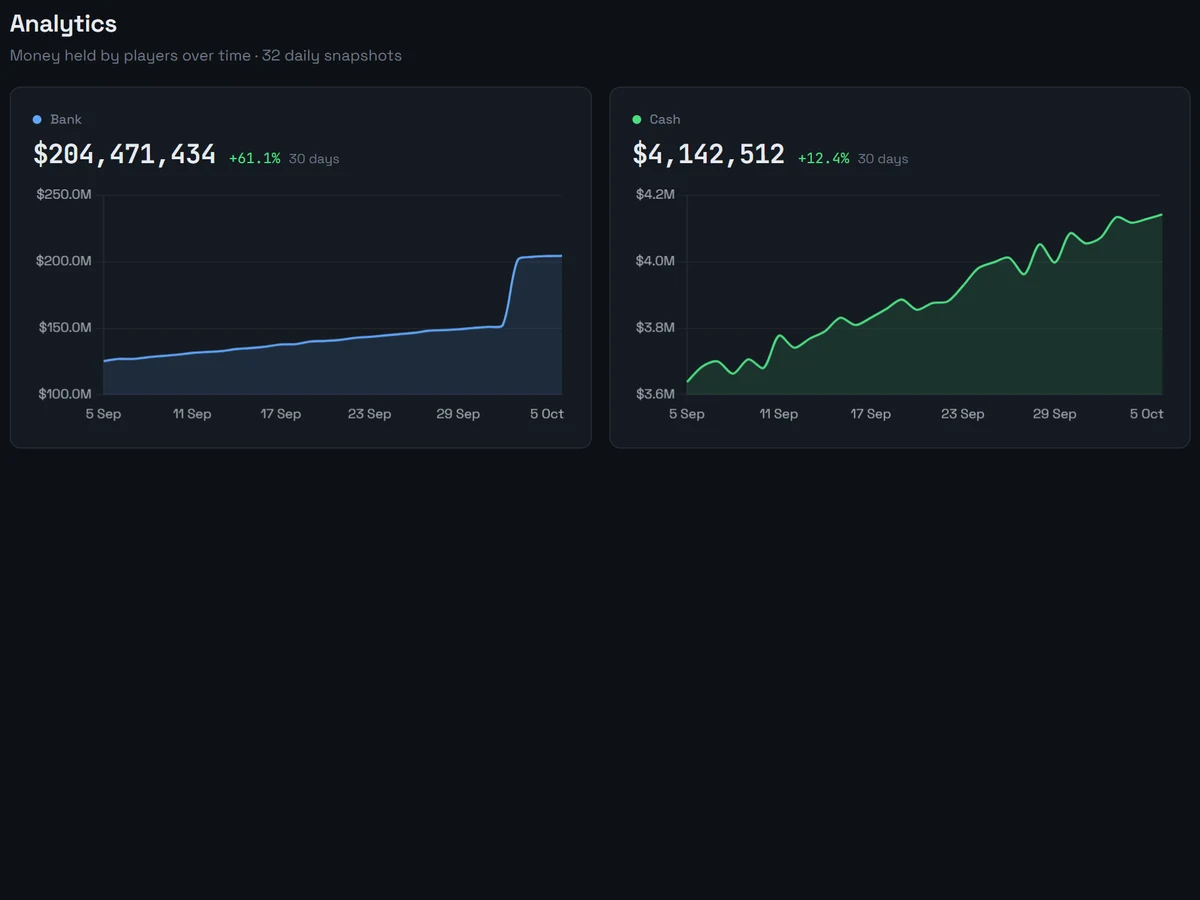
| Analytics | Money per account over time (needs the cron job). |
| Staff Activity | Staff actions over time, hourly heatmap, category breakdown, ranking. |
Administration
| Feature | Description |
|---|---|
| Audit Log | Staff action trail with filters, pagination, CSV export and purge. |
| Webhooks | Multiple endpoints with Discord embeds, Slack attachments or generic JSON. |
| Settings | 8 tabs: General, Appearance, Game Config, Economy, Limits, Staff, Permissions, System. |
| Permissions | Per-role page and action permissions stored in the database, plus custom roles. |
| Profile | Change your own password. |
Interface
- Dark theme with a configurable accent colour and logo.
- Sidebar grouped into Overview, Players, World, Insights and Admin. It collapses on desktop (the state is remembered) and becomes a drawer on mobile.
- Top bar with the page title, quick search, profile and logout.
- Skin viewer grouped into sections (Identity, Hair, Face, Makeup, Clothing, Damage).
- Inventory, stash, trunk and glovebox contents shown with item labels and counts.
- Charts drawn with Chart.js.
Requirements
Server
| Component | Minimum | Notes |
|---|---|---|
| PHP | 7.4 | Checked by the installer. PHP 8.1+ is recommended for security support. |
| MySQL | 5.7.8 | JSON functions are required. |
| MariaDB | 10.2.7 | JSON functions and the JSON column alias are required. |
| Web server | Apache 2.4 with mod_rewrite and mod_headers, or Nginx + PHP-FPM |
The shipped protection rules are in .htaccess (Apache only). |
The panel uses these SQL JSON functions: JSON_EXTRACT, JSON_UNQUOTE, JSON_SET, JSON_OBJECT and JSON_VALID.
PHP Extensions
| Extension | Purpose |
|---|---|
pdo_mysql |
Database access (required) |
json |
JSON columns, settings, cache (required) |
session |
Login sessions (required) |
mbstring |
Name initials in the sidebar, quick search, skin viewer. The installer lists it as optional, but install it. |
fileinfo |
Logo upload type check |
curl |
Live page requests (falls back to file_get_contents when missing) |
The panel directory and cache/ must be writable by the web server during installation (the installer writes config.php). assets/img/ and assets/data/ must be writable for logo and item catalogue uploads.
Supported Environments
- XAMPP (Windows) for local or small setups
- LAMP (Apache + PHP + MySQL/MariaDB) on Linux
- Nginx + PHP-FPM: port the
.htaccessrules to your server block (see Security) - Shared hosting with PHP 7.4+ and MySQL/MariaDB
Installation
Method 1: Installer (recommended)
1. Copy the files
| Environment | Path |
|---|---|
| XAMPP (Windows) | C:\xampp\htdocs\xex-panel\ |
| Linux / Apache | /var/www/html/xex-panel/ |
| Nginx | Your configured web root |
2. Open the installer
http://your-server/xex-panel/install/The installer has six steps:
- Requirements: PHP version, extensions, writable directories.
- Database: host, user, password and database name of your FiveM database. The host may include a port, for example
127.0.0.1:3307. - Framework: the detected framework is preselected. Choose ESX, QBCore, Qbox or Custom.
- Review: lists the panel tables that will be created and the ones that already exist. Game tables are not modified.
- Admin account and panel settings: superadmin username, email and password, panel name and FiveM API URL.
- Done: shows the result for each table.
The installer creates the panel tables with CREATE TABLE IF NOT EXISTS (seed rows with INSERT IGNORE), writes config.php and creates install/installed.lock.
Password policy: at least 8 characters with an uppercase letter, a lowercase letter and a number.
3. Log in
http://your-server/xex-panel/Then delete or block the install/ folder.
Method 2: Manual installation
1. Import the schema
Import setup/schema.sql into your FiveM database (the panel tables live next to your game tables):
mysql -u root -p your_database < setup/schema.sql2. Create config.php
config.php is not shipped; the installer normally writes it. Create it in the panel root with this content:
<?php
$MODE = "production"; // "development" shows PHP errors

if ($MODE === 'production') {
    error_reporting(0);
    ini_set('display_errors', 0);
    ini_set('log_errors', 1);
} else {
    error_reporting(E_ALL);
    ini_set('display_errors', 1);
}

// ─── Database (host may include a port: 127.0.0.1:3307) ───
$DDBB_HOST = 'localhost';
$DDBB_USER = 'root';
$DDBB_PASSWORD = 'your_password';
$DATABASE_NAME = 'your_database';
$HOST = '';

// ─── Framework: "esx" | "qbcore" | "qbox" | "custom" ───
$FRAMEWORK = 'esx';

// ─── Table and column overrides (empty = framework defaults) ───
$DB_TABLES = [];

// ─── Panel ───
$PANEL_NAME = 'Admin Panel';
$API_FIVEM_URL = '';
$WEBHOOK_URL = '';

require_once __DIR__ . '/includes/bootstrap.php';
3. Create an admin account
INSERT INTO superadmins (username, password, email, role, force_password_change)
VALUES ('admin', '$2y$10$your_bcrypt_hash', 'admin@example.com', 3, 1);
Generate the hash with php -r "echo password_hash('your_password', PASSWORD_DEFAULT);". With force_password_change = 1 the panel asks for a new password after the first login.
Post-installation
Live page and online status
Set Settings → General → FiveM API URL. The value from $API_FIVEM_URL is only the starting default. Accepted responses:
- the cfx.re server API:
https://servers-frontend.fivem.net/api/servers/single/YOUR_SERVER_ID/(players, server variables and resources) - a plain player list such as your server’s
http://IP:30120/players.json, or any JSON with aplayersarray
The player profile uses the same URL to show whether the character’s Rockstar license is online. When the URL is empty, the Live menu entry has nothing to show.
Item labels
Upload your item list in Settings → Game Config → Item catalogue:
ox_inventory/data/items.luaqb-core/shared/items.lua(or the Qbox equivalent)- or a JSON file:
{"water": "Water"},{"water": {"label": "Water"}}or[{"name": "water", "label": "Water"}]
The file (up to 4 MB) is parsed and stored as assets/data/items.json. Without an upload the panel uses the ESX items table, and otherwise the item names found in player inventories. Use automatic source removes the uploaded catalogue.
Analytics cron job (optional)
setup/cronjob_money_analytics.php stores one snapshot per account that exists on your server (ESX: bank, cash, black money; QBCore/Qbox: bank, cash, crypto; plus any custom currency you configured).
Linux (crontab):
0 */6 * * * php /var/www/html/xex-panel/setup/cronjob_money_analytics.phpWindows (Task Scheduler):
- Create Basic Task → name
XeX Panel Analytics - Trigger: daily, repeat every 6 hours
- Action: Start a program
- Program:
C:\xampp\php\php.exe - Arguments:
C:\xampp\htdocs\xex-panel\setup\cronjob_money_analytics.php
- Program:
Without the cron job the Analytics page has no data.
Upgrading from 2.1
- Back up your database and the panel folder.
- Replace all files with the 2.2.0 files, except:
config.phpinstall/installed.lockassets/img/custom-logo.*(if present)assets/data/items.json(if present)
- Open the panel. A
config.phpgenerated by 2.1 keeps working: the 2.2 bootstrap and security files only define values the old config does not already set. - Optional: upload your
items.luain Settings → Game Config (the item file bundled with 2.1 is no longer used) and check Settings → System → Detected resources.
Optional: switch to the shorter 2.2 config
In 2.2, config.php only holds values (database, framework, $DB_TABLES overrides, panel name, FiveM API URL) and ends with require_once __DIR__ . '/includes/bootstrap.php';. Defaults per framework live in includes/framework.php. To regenerate it:
- Copy your current
config.phpsomewhere safe. - Delete
install/installed.lockand open/install/. - Go through the steps. Existing panel tables are kept (
CREATE TABLE IF NOT EXISTS,INSERT IGNORE), and the installer overwritesconfig.php. - The installer also creates a superadmin account. Use a username that does not exist yet, or the step fails.
- The new config has an empty
$DB_TABLES. If your old config mapped anything the defaults do not cover (a custom currency key, a premium table, a renamed table), copy those keys into the new$DB_TABLES. - Delete or block the
install/folder again.
Configuration
Values live in config.php. Most runtime options are in the Settings page.
Application mode
$MODE = "production";   // errors logged only (use this in production)
$MODE = "development";  // errors shown on screen
Database
$DDBB_HOST = 'localhost';        // or '127.0.0.1:3307' for a non-default port
$DDBB_USER = 'root';
$DDBB_PASSWORD = 'your_password';
$DATABASE_NAME = 'your_database';
Framework
$FRAMEWORK = 'esx';      // ESX Legacy
$FRAMEWORK = 'qbcore';   // QBCore
$FRAMEWORK = 'qbox';     // Qbox
$FRAMEWORK = 'custom';   // ESX-like layout with your own names in $DB_TABLES
Table and column overrides
$DB_TABLES is for overrides only. Leave it empty unless your server renames something. Defaults are in fw_default_tables() in includes/framework.php.
$DB_TABLES = [
    'account_black' => 'dirty_money',   // ESX account key for black money
    'account_coin'  => 'coins',         // extra currency stored in accounts/money JSON
    'housing'       => 'my_houses',     // ESX / Custom: housing table
    'housing_owner' => 'owner',
    'premium'       => 'my_premium',    // optional premium/VIP table
];
ESX / Custom keys and defaults
| Key | Default | Meaning |
|---|---|---|
users |
users |
Player table |
users_identifier |
identifier |
Player key |
users_firstname / users_lastname |
firstname / lastname |
Name columns |
users_accounts |
accounts |
Accounts JSON column |
users_group |
group |
Admin group |
users_job / users_job_grade |
job / job_grade |
Job columns |
users_inventory |
inventory |
Inventory JSON |
users_skin |
skin |
Skin JSON |
users_pincode |
pincode |
Pincode column |
users_created_at / users_last_seen |
created_at / last_seen |
Dates |
account_bank / account_cash / account_black |
bank / money / black_money |
Keys inside accounts |
account_coin |
none | Optional extra currency key inside accounts |
vehicles, vehicles_owner, vehicles_plate |
owned_vehicles, owner, plate |
Vehicles |
licenses, licenses_owner, licenses_type |
user_licenses, owner, type |
Licences |
job_grades, jobs, items |
job_grades, jobs, items |
Jobs and items |
societies, society_data |
addon_account, addon_account_data |
Society accounts |
billing, datastore, inventory_items |
billing, datastore_data, addon_inventory_items |
Other ESX tables |
ox_inventory |
ox_inventory |
ox_inventory stashes |
housing, housing_owner |
auto-detected | Housing table |
phone |
auto-detected (phone_phones) |
Phone table (needs an id column) |
premium |
none | Premium table (needs an identifier column with the license hash) |
A column that does not exist on your table is skipped, and the field is hidden in the UI.
QBCore / Qbox keys and defaults
The players JSON layout (charinfo, job, gang, money, metadata) is fixed. These keys can still be overridden:
| Key | Default | Meaning |
|---|---|---|
users |
players |
Player table |
users_accounts |
money |
Money JSON column |
users_inventory |
inventory |
Inventory JSON |
users_last_seen |
last_updated |
Last seen |
account_bank / account_cash |
bank / cash |
Keys inside money |
account_coin |
crypto |
Shown as the extra currency (“Crypto”) |
vehicles |
player_vehicles |
Vehicles table |
skins |
playerskins |
Skins table |
ox_inventory |
ox_inventory |
ox_inventory stashes |
phone, premium |
as above | Optional tables |
ESX-only keys (names, group, job columns, licences table, job grades, societies, billing, datastore, black money, housing) are ignored on QBCore/Qbox, so an old config that mapped them to charinfo cannot write plain text into a JSON column.
Accounts
| Framework | Accounts shown |
|---|---|
| ESX | Bank (bank), Cash (money), Black money (black_money) |
| QBCore / Qbox | Bank (bank), Cash (cash), Crypto (crypto) as the extra currency |
Set account_coin in $DB_TABLES to show a custom currency stored in the accounts/money JSON. Display labels are editable in Settings → Game Config → Account Labels. The extra currency is not counted in wealth totals.
General settings (Settings → General)
| Setting | Default |
|---|---|
| Panel name | Admin Panel (or the value from the installer) |
| FiveM API URL | value of $API_FIVEM_URL |
| Currency symbol / position | $ / before |
| Session timeout (seconds) | 3600 |
| Cache TTL (seconds) | 300 |
| Max login attempts | 5 |
| Login lockout time (seconds) | 900 |
| DataTable page sizes | 20,50,100 |
Appearance (Settings → Appearance)
- Accent colour: any
#rrggbb. Text drawn on the accent switches between dark and light automatically for contrast. - Logo: PNG, JPG or WebP, up to 512 KB, stored as
assets/img/custom-logo.*and also used as the favicon. Without a logo the sidebar shows the initials of the panel name.
Game Config (Settings → Game Config)
| Setting | Description |
|---|---|
| Item catalogue | Upload items.lua or JSON for item labels |
| Account Labels | Names shown for bank, cash, black money and the extra currency |
| License Types | Licence keys offered when granting (ESX defaults: dmv, drive, drive_bike, drive_truck, weapon; QB defaults: driver, weapon, business) |
| Job Configuration | Default “unemployed” job name used by job reset and Qbox group sync; job list for the ESX job-vehicle delete form |
Economy (Settings → Economy)
| Setting | Default |
|---|---|
| Wealth multiplier (Economy page) | 5 |
| Std-dev multiplier (Anomalies page) | 3 |
| Cash-heavy ratio / minimum total | 0.8 / 10000 |
| Severity: critical / high (× average) | 20 / 10 |
| Alert dedup window (hours) | 24 |
| Salary and society colour thresholds | 5000/1000, 1000000/100000 |
| Active / inactive employee window (days) | 7 / 30 |
| Wealth brackets | <1K … >1M |
Limits (Settings → Limits)
Row counts for the Economy, Anomalies, Business, Staff Activity and Webhook pages, and for quick search results (players 8, vehicles 5).
Panel Modules
Dashboard (home.php)
- Money totals per account that exists on your server, plus business funds
- Unique users (by Rockstar license) and characters
- Vehicles, houses, societies and item counts, when those sources exist
- Active premium rows, only when a premium table is configured
- Open anomaly alerts and the last 8 staff actions (for roles that can see those pages)
Players (users.php → view-user.php)
List: search and sort with DataTables. Columns follow your framework (group on ESX, gang on QB, black money and extra currency when present). The list is cached in cache/users_<framework>.json and cleared after player edits.
Profile:
- Report card: total wealth, accounts, vehicle, house and licence counts, online status, staff tags and notes
- Player information: name, job and grade, group and pincode (ESX), inventory JSON, skin JSON. On ESX the job is checked against
job_grades. - Accounts: editable balances for the accounts your server has
- Licences: grant and revoke
- Data explorer tabs: vehicles (with trunk and glovebox), houses, inventories (ox_inventory stashes), phone, outfits, premium, each shown only when the source exists
Edits require the matching action permission and a CSRF token.
Vehicles (vehicles.php)
- Total, stored and out/impounded counts, models and garages
- Delete a vehicle by plate (all frameworks)
- Send a vehicle to a garage by plate: ESX sets
parking,stored = 1, clearspound; QBCore/Qbox setgarage,state = 1,depotprice = 0(each column only if it exists) - Delete a player’s job vehicles (ESX only, needs a
jobcolumn onowned_vehicles) - ESX model hashes are resolved through the esx_vehicleshop
vehiclestable when present
Societies (societies.php → view-societies.php)
- Funds from the detected business-funds source (see Optional Resources)
- Members of the job or gang with grade and last seen
- ESX: society ox_inventory stash, addon inventory and datastore weapons
Houses (houses.php)
- Properties with owner name and, when available, shell/interior/tier
- Hidden when no housing resource is detected
Job Grades (grades.php, linked from Societies)
- ESX: job name, grade, label and salary from
job_grades - QBCore/Qbox: jobs currently held by players, with headcount
Item Finder (itemsFinder.php → search-items.php)
- Lists the item catalogue
- Searches player inventories (and ESX loadouts), ox_inventory stashes, ESX addon inventories and datastores, vehicle trunk/glovebox columns, and qb-inventory tables (
stashitems,trunkitems,gloveboxitems,inventories) when they exist - Shows owner, location and count
Live Server (live.php)
- Connected players from the configured API URL (name, server ID, ping, license), with a link that searches the players list by license
- When the API cannot be reached, the page shows the error it received
- Max clients, project name/description and resources when the cfx.re API is used
Character Kill (ck_user.php → makeck.php)
Deletes the player row last, inside a transaction, after these related rows (each table only if it exists):
| ESX / Custom (by identifier) | QBCore / Qbox (by citizenid) |
|---|---|
player-owned addon_account_data, addon_inventory_items, datastore_data rows |
player_vehicles |
billing, owned_vehicles, user_licenses |
playerskins, player_outfits |
| housing, phone and premium rows | player_houses, phone_invoices |
ox_inventory rows owned by the player |
ox_inventory rows owned by the player, player_groups (Qbox) |
Enter the ESX identifier or the QB/Qbox citizenid.
Swap (swaps.php → controllers/swap-controller.php)
- ESX / Custom: moves everything from the old identifier to the new one. It first runs a CK on the new identifier, then updates the identifier in the player table, vehicles, licences, housing, ox_inventory, addon accounts/inventories, datastores and billing (identifier, sender, target). Swapping an identifier onto itself is refused.
- QBCore / Qbox: moves a character (citizenid) to another Rockstar license (
license:<hash>or the bare hash). Nothing is deleted. It updatesplayers.license, assigns the next freecidon the new license, updatesplayer_vehicles.license, and on Qbox setsplayers.userIdto the matchingusersrow.
Player export (export-players.php)
- Export CSV on the Players page downloads every character with identifier, name, job, grade, gang (QB), each account and last seen
- UTF-8 with BOM so Excel keeps accents; cells that start with
=,+,-or@are prefixed to prevent formula injection - Requires the
export_playersaction
Demo mode
Set $DEMO_MODE = true; in config.php to run a read-only panel, for example a public demo with fake data. Every form submission except signing in and item search is refused before it reaches a controller, and the top bar shows Demo · read-only. $DEMO_LOGIN = ['demo', 'demo']; shows those credentials on the sign-in page. Create that account as a normal staff account first.
Analytics (analytics.php)
- One chart per account, each on its own scale, with the latest total and the change over 30 days
- Several snapshots on the same day are reduced to the last one
Role & Permission System
Built-in roles
| Role | Level |
|---|---|
| Viewer | 0 |
| Moderator | 1 |
| Admin | 2 |
| Superadmin | 3 |
These four system roles cannot be deleted. Superadmins can create custom roles (name, level, colour) on the Permissions page and grant pages and actions per role. Permissions saved there replace the defaults below for that role. Superadmins have access to everything.
Default page access
| Page | Viewer | Moderator | Admin | Superadmin |
|---|---|---|---|---|
| Dashboard, Live, Players list, Societies, Houses, Item Finder, Job Grades, Analytics | ✅ | ✅ | ✅ | ✅ |
| Player profile, Society detail | ❌ | ✅ | ✅ | ✅ |
| Vehicles, Character Kill form, Swap form, Job reset, Add licence, Audit Log | ❌ | ❌ | ✅ | ✅ |
| Licenses page, Economy, Business, Anomalies, Staff Activity, Webhooks, Settings, Permissions | ❌ | ❌ | ❌ | ✅ |
Pages in the last row can be granted to other roles on the Permissions page.
Default action permissions
| Action | Minimum role |
|---|---|
edit_user_data |
Admin |
edit_user_money |
Admin |
delete_job |
Admin |
manage_vehicles |
Admin |
manage_licenses |
Moderator |
character_kill |
Superadmin |
swap_players |
Superadmin |
create_staff |
Superadmin |
remove_staff |
Superadmin |
change_password |
Moderator |
view_settings |
Superadmin |
manage_permissions |
Superadmin |
export_players |
Admin |
export_audit |
Admin |
purge_audit |
Superadmin |
manage_webhooks |
Superadmin |
Staff notes and tags on player profiles require Moderator or higher.
Webhook System
Formats
| Format | Detected by | Payload |
|---|---|---|
| Discord | URL contains discord.com/api/webhooks |
Embed with colour, fields and timestamp |
| Slack | URL contains hooks.slack.com |
Attachment with colour and fields |
| Generic JSON | any other URL | event, data and timestamp |
Events (13)
| Event | Trigger |
|---|---|
user.money_changed |
Account balance edited |
user.data_changed |
Player data edited |
user.license_added |
Licence granted |
user.license_swapped |
Swap performed |
user.character_killed |
Character kill performed |
user.job_reset |
Job reset to the default job |
vehicle.deleted |
Vehicle(s) deleted |
vehicle.sent_garage |
Vehicle sent to garage |
staff.created |
Staff account created |
staff.removed |
Staff account deleted |
staff.password_changed |
Staff password changed |
panel.login |
Successful login |
panel.login_failed |
Failed login |
Setup
- Open Webhooks in the sidebar
- Create a webhook with a name, URL and the events to send
- Use Test to send a test payload
Each delivery is logged in panel_webhook_logs (event, payload, HTTP status, response) and listed on the Webhooks page.
Legacy Discord webhook
$WEBHOOK_URL in config.php still receives a plain-text message for actions logged through the legacy audit function. Prefer the Webhooks page.
Audit Log
Staff actions are stored in panel_audit_log and shown on the Audit Log page.
Recorded: timestamp, username, role, action, category, target, details, IP address, user agent.
- 7 filters: user, category, action, target, IP, date from, date to
- 50 entries per page
- Stats: today, this week, active users, failed logins (24 h)
- CSV export of the filtered results
- Purge of entries older than N days (minimum 7); the purge form is shown to Superadmins
Intelligence Suite
Economy (economy.php)
- Totals per account, average and maximum wealth (wealth = bank + cash + black money; the extra currency is excluded)
- Top richest players, money by job, wealth brackets
- Players above the wealth multiplier, cash-heavy players
- Charts
Business Analytics (business-analytics.php)
- Headcount per job, society funds
- Active / semi-active / inactive employees per job (by last seen)
- Abandoned businesses, unemployed count, grade distribution
Anomaly Detection (anomalies.php)
| Alert | Severity |
|---|---|
| Extreme wealth (above mean + N standard deviations) | Critical, high or medium, by multiple of the average |
| Negative balance | Low |
- Alerts are generated when the page loads and de-duplicated within the dedup window
- Filter by severity and type; dismiss alerts
- Stored in
panel_anomaly_alerts
Staff Activity (staff-activity.php)
- Total actions, active staff, average per day
- Daily trend, category breakdown, hourly heatmap
- Staff ranking and most common actions
- Range: 7, 14, 30, 60 or 90 days
Customization
Translations
UI strings are in translations.php as $T_* variables:
$T_PAGE_HOME = 'Home';
$T_TOTAL_CARS = 'Total Cars';
The panel ships in English.
Theme
Pick the accent colour and logo in Settings → Appearance. For deeper changes, edit the CSS variables at the top of style.css:
:root {
    --bg: #0e1116;          /* page background */
    --surface: #151a21;     /* cards */
    --border: #252c36;
    --text: #e7eaef;
    --text-2: #a7afbc;      /* secondary text */
    --accent: #c5f24a;      /* overridden by Settings → Appearance */
}
Menu
The sidebar groups and entries are defined in panel_menu() in includes/layout.php.
Database Reference
Panel tables
Created in your FiveM database with CREATE TABLE IF NOT EXISTS. Running the installer or setup/schema.sql again is safe.
| Table | Purpose |
|---|---|
superadmins |
Staff accounts (bcrypt passwords, role) |
analytics_money |
Money snapshots from the cron job |
panel_audit_log |
Staff action trail |
panel_webhooks |
Webhook endpoints and events |
panel_webhook_logs |
Webhook deliveries |
panel_roles |
Roles and their permissions (JSON) |
panel_player_notes |
Staff notes and tags on players |
panel_anomaly_alerts |
Anomaly alerts |
panel_settings |
Settings key/value store |
Game tables used by the panel
The panel never creates, drops or alters these tables. It reads them and, for the operations listed, writes rows.
| Purpose | ESX | QBCore / Qbox | Operations |
|---|---|---|---|
| Players | users |
players (charinfo, job, gang, money, metadata JSON) |
Read / update / delete (CK) / swap |
| Licences | user_licenses |
players.metadata.licences |
Read / write / delete |
| Vehicles | owned_vehicles |
player_vehicles |
Read / update / delete |
| Skins / outfits | users.skin, datastore_data |
playerskins, player_outfits |
Read / update skin / delete (CK) |
| Job groups | — | player_groups (Qbox) |
Write on job change / delete (CK) |
| Job grades | job_grades, jobs |
— (shared/jobs.lua) |
Read |
| Business funds | addon_account, addon_account_data |
management_funds, bank_accounts, bank_accounts_new |
Read |
| Billing | billing |
phone_invoices |
Delete (CK) / swap (ESX) |
| Society items | addon_inventory_items, datastore_data |
stashitems, trunkitems, gloveboxitems, inventories |
Read / delete and swap (ESX) |
| ox_inventory | ox_inventory |
ox_inventory |
Read / delete (CK) / swap (ESX) |
| Housing | loaf_housing, owned_properties, properties |
properties, player_houses |
Read / delete (CK) / swap (ESX) |
| Phone | phone_phones |
phone_phones |
Read / delete (CK, ESX) |
| Items | items |
— | Read |
| Vehicle names | vehicles (esx_vehicleshop) |
— | Read |
| Qbox users | — | users (Qbox) |
Read (swap) |
| Premium | configured table | configured table | Read / delete (CK, ESX) |
File Structure
xex-panel/
├── config.php                      # Created by the installer (values only)
├── .htaccess                       # Apache protection rules and headers
├── index.php                       # Login
├── export-players.php              # Player list CSV export
├── home.php                        # Dashboard
├── live.php                        # Live server
├── users.php                       # Player list
├── view-user.php                   # Player profile
├── licenses.php                    # Grant licences
├── makelicenses.php                # Licence grant handler
├── delete-job.php                  # Job reset handler
├── ck_user.php                     # Character kill form
├── makeck.php                      # Character kill handler
├── swaps.php                       # Swap form
├── societies.php                   # Society list
├── view-societies.php              # Society detail
├── grades.php                      # Job grades
├── houses.php                      # Housing
├── vehicles.php                    # Vehicles
├── itemsFinder.php                 # Item catalogue and search form
├── search-items.php                # Item search results
├── analytics.php                   # Money over time
├── economy.php                     # Economy
├── business-analytics.php          # Business analytics
├── anomalies.php                   # Anomaly detection
├── staff-activity.php              # Staff activity
├── audit.php                       # Audit log
├── webhooks.php                    # Webhooks
├── settings.php                    # Settings (8 tabs)
├── permissions.php                 # Roles and permissions
├── profile.php                     # Own profile and password
├── logout.php
├── translations.php                # UI strings
├── style.css                       # Styles (CSS variables)
├── main.js                         # Sidebar, quick search, tables
├── favicon.ico
│
├── controllers/                    # Form handlers (POST only, except quick search)
│   ├── authenticate.php            # Login
│   ├── createuser.php              # Create staff account
│   ├── data-controller.php         # Player data edits
│   ├── editpass-controller.php     # Password change
│   ├── money-controller.php        # Account edits
│   ├── notes-controller.php        # Player notes and tags
│   ├── remove-license-controller.php
│   ├── remove-staff-controller.php
│   ├── remove-veh-controller.php   # Delete vehicle(s)
│   ├── search-global.php           # Quick search (GET, JSON)
│   ├── search-veh-controller.php   # Vehicle search by plate
│   ├── send-veh-controller.php     # Send vehicle to garage
│   ├── settings-controller.php     # Settings, logo and item uploads
│   └── swap-controller.php         # Swap
│
├── includes/
│   ├── bootstrap.php               # Loaded by config.php: roles, default access, helpers
│   ├── security.php                # Sessions, headers, CSRF, DB connection, CK and swap
│   ├── framework.php               # Framework adapter and schema detection
│   ├── fw_players.php              # Adapter: per-player helpers
│   ├── fw_world.php                # Adapter: economy, housing, vehicles, items, live API
│   ├── settings_helper.php         # Settings store, appearance helpers
│   ├── permissions.php             # Granular permissions engine
│   ├── webhooks.php                # Webhook delivery
│   ├── layout.php                  # Menu definition and page titles
│   ├── header.php                  # <head> assets (CDN with SRI)
│   ├── sidebar.php                 # Sidebar shell
│   ├── topbar.php                  # Top bar shell
│   ├── menu.php                    # Sidebar links filtered by access and detected data
│   └── chart.php                   # Chart.js loader and defaults
│
├── install/
│   └── index.php                   # Installer (6 steps)
│
├── setup/
│   ├── schema.sql                  # Panel tables
│   └── cronjob_money_analytics.php # Analytics snapshots
│
├── assets/
│   ├── data/                       # items.json (created by the item catalogue upload)
│   └── img/                        # custom-logo.* (created by the logo upload)
│
└── cache/                          # Runtime files
    ├── schema.json                 # Detected tables (~2 min)
    ├── users_<framework>.json      # Player list cache
    ├── cacheAnalytics.txt          # Analytics cache
    └── login_attempts.json         # Login rate limiting
Troubleshooting
| Issue | Cause | Solution |
|---|---|---|
| “Database connection error” | Wrong credentials, wrong port or database down | Check $DDBB_HOST (use host:port for a non-default port), $DDBB_USER, $DDBB_PASSWORD, $DATABASE_NAME. |
| Blank page | PHP error hidden in production mode | Set $MODE = "development" temporarily and check the PHP error log. |
| Missing panel table errors | Panel tables not created | Run the installer or import setup/schema.sql. |
| “Invalid security token” | Session expired or form opened in another session | Log in again; increase the session timeout in Settings if needed. |
| A menu entry or page section is missing | The resource was not detected | Check Settings → System → Detected resources, click Rescan, or set the table name in $DB_TABLES. |
| Wrong framework | Detection picked another layout | Set $FRAMEWORK in config.php (esx, qbcore, qbox, custom). |
| Items show internal names | No item catalogue | Upload ox_inventory/data/items.lua or qb-core/shared/items.lua in Settings → Game Config → Item catalogue. |
| Logo upload fails | File too large or folder not writable | Use PNG/JPG/WebP up to 512 KB; make assets/img/ writable. |
| Analytics page empty | No snapshots yet | Set up the cron job. |
| Live page empty | API URL missing, wrong or server not reachable | Set Settings → General → FiveM API URL. The page shows the error it received (connection, HTTP status or invalid JSON). |
| Quick search returns nothing (Apache) | Old .htaccess blocks GET to controllers |
Use the 2.2 .htaccess, which allows GET to controllers/search-global.php. |
| Redirect to HTTPS on a server without a certificate | Old .htaccess |
The 2.2 .htaccess skips the redirect for localhost, 127.0.0.1 and [::1]. For other hosts, install a certificate or remove the redirect block. |
| Installer blocked | Already installed | Delete install/installed.lock. |
| Permissions not saving | Missing DB rights | The MySQL user needs INSERT/UPDATE on panel_roles. |
Log files
- PHP errors: your PHP error log (XAMPP:
C:\xampp\php\logs\php_error_log) - Webhook deliveries: Webhooks page or
panel_webhook_logs - Login attempts:
cache/login_attempts.json - Staff actions: Audit Log page or
panel_audit_log
Security
Authentication & sessions
- Passwords hashed with
password_hash()(PASSWORD_DEFAULT), rehashed on login when needed - Password policy for new accounts and changes: 8+ characters with uppercase, lowercase and a number
- Accounts flagged with
force_password_changemust change their password before using the panel - Session ID regenerated on login
- Session cookie re-issued with
HttpOnly,SameSite=Strict, andSecurewhen the request is HTTPS - Session timeout (default 1 hour)
- Login rate limiting per IP, stored on disk
- The login error does not reveal whether a username exists
Request protection
- CSRF tokens on forms (including the item search), rotated after each successful check
- State-changing operations use POST
- PDO prepared statements with emulation disabled; values such as thresholds and job names are bound as parameters
- Table and column names from configuration are validated before use
- Output escaped with
e()/attr(); data passed to JavaScript is JSON-encoded
HTTP headers
Sent by includes/security.php (and by .htaccess on Apache):
X-Frame-Options: DENYX-Content-Type-Options: nosniffX-XSS-Protection: 1; mode=blockReferrer-Policy: strict-origin-when-cross-originPermissions-Policy: camera=(), microphone=(), geolocation=()Strict-Transport-Security(HTTPS requests only)
Front-end dependencies
Loaded from CDNs with Subresource Integrity hashes: jQuery 3.7.1, DataTables core 1.13.7, Font Awesome 6.5.1, Chart.js 4.4.1. Fonts come from Google Fonts.
File protection
.htaccess (Apache):
- Redirects HTTP to HTTPS, except for
localhost,127.0.0.1and[::1] - Blocks non-POST requests to
controllers/*.php, exceptcontrollers/search-global.php(quick search) - Blocks
includes/*.php,setup/andcache/ - Denies
.sql,.log,.txt,.md,.json,.bak,.old,.orig,.savefiles andconfig.php - Disables directory listing
On Nginx, add equivalent rules to your server block.
Production checklist
- Serve the panel over HTTPS
- Restrict access (firewall, VPN or IP allow-list)
- Keep
$MODE = "production" - Delete or block
install/after installation - Review the audit log regularly
- Keep PHP and MySQL/MariaDB updated
- Back up the database, including panel tables
Changelog
v2.2.0
New
- Player list export to CSV
- Read-only demo mode (
$DEMO_MODE) - Analytics shows one chart per account with its own scale and the 30-day change
export_audit,purge_auditandmanage_webhooksare now enforced and can be granted to custom roles
Frameworks
- ESX Legacy, QBCore and Qbox are supported natively through a new adapter (
includes/framework.php,includes/fw_players.php,includes/fw_world.php) - QBCore/Qbox JSON columns (
charinfo,job,gang,money,metadata.licences) are read withJSON_EXTRACTand written withJSON_SET - Qbox
player_groupsis kept in sync on job changes - The installer detects ESX, QBCore and Qbox and has a Qbox option
Configuration
config.phpholds only values and ends withrequire_once includes/bootstrap.php; defaults per framework moved toincludes/framework.php$DB_TABLESis now for overrides only- The database host can include a port (
127.0.0.1:3307) - Configs generated by 2.1 keep working
Resources and data
- Optional resources are detected automatically; their pages and menu entries are hidden when absent
- New Settings → System → Detected resources with Rescan
- Housing: loaf_housing, esx_property, ps-housing, qbx_properties, qb-houses
- Business funds: ESX addon accounts, qb-management, qb-banking, Renewed-Banking
- Billing: ESX
billing, qb-phonephone_invoices - Accounts follow the framework; QBCore/Qbox crypto is shown as the extra currency. A custom currency can be set with
account_coin - Item catalogue upload (
items.luafrom ox_inventory or qb-core, or JSON) replaces the bundled item list - Character kill and swap are framework-aware; QBCore/Qbox swap moves a character to another Rockstar license; ESX swap refuses swapping an identifier onto itself
- Send to garage and delete by plate work on all frameworks; delete job vehicles is ESX only
- The analytics cron records only the accounts that exist
Interface
- New dark UI with grouped, collapsible sidebar and top bar
- Quick search (
Ctrl+K/Cmd+K) for players, plates and pages, case-insensitive on every framework - Settings → Appearance: accent colour and logo upload
- Bootstrap 3 removed; DataTables core 1.13.7 and Chart.js 4.4.1 pinned with SRI
- Shared page shell:
includes/sidebar.php,includes/topbar.php,includes/layout.php,includes/header.php
Security
- Hardened session cookie flags are now actually applied (
HttpOnly,SameSite=Strict,Secureon HTTPS) - Login no longer reveals whether a username exists
.htaccessno longer forces HTTPS on localhost and allows GET to the quick search endpoint only- CSRF check added to the item search
- Output-escaping fixes on several pages
- SQL thresholds bound as parameters
Removed
- Bundled images in
assets/img/and the bundled item list inassets/data/
v2.1.0
- Intelligence Suite — Economy Dashboard, Business Analytics, Anomaly Detection, Staff Activity
- Dynamic Settings — Full in-panel configuration (no file editing for most settings)
- Granular Permissions — DB-backed per-role permissions engine with custom role creation
- Webhook System — Multi-endpoint webhooks with Discord, Slack, and generic JSON support (13 events)
- Player Notes — Staff-to-staff notes on player profiles
- Advanced Audit Log — 7 filters, CSV export, stats cards, auto-purge
- Wealth Brackets — Configurable wealth distribution ranges
- Staff Activity Tracking — Heatmaps, trend charts, ranking, category breakdown
v2.0.0
- Multi-framework support — ESX Legacy, QBCore, and custom framework table mapping
- Role-based access control — 4 built-in roles with configurable page and action permissions
- CSRF protection — All forms and state-changing requests
- XSS protection — Output escaping on all user-generated data
- Secure caching — JSON-based cache replacing insecure PHP serialization
- Rate limiting — Login attempt throttling with configurable lockout
- Modernized UI — Dark theme with Inter font family, CSS variables, responsive design
- Updated dependencies — jQuery 3.7, DataTables 1.13, Font Awesome 6.5
- Security hardening — Removed exposed password hashes, POST-only controllers, self-deletion protection, debug cleanup
License
This is a commercial product. Unauthorized redistribution, resale, or modification for resale is prohibited.
© 2024–2026 XeX Panel. All rights reserved.