Script docs · Free
Synced TVs
YouTube and a free movie library on any TV or screen, in sync for everyone nearby.
- Version
- v1.0.0
- Frameworks
- Standalone · ESX · QBCore · Qbox
- Requires
- ox_lib
- Source
- Open source
- resmon
- 0.01 ms idle · 0.03 ms playing
- Updated
- 6 Oct 2026
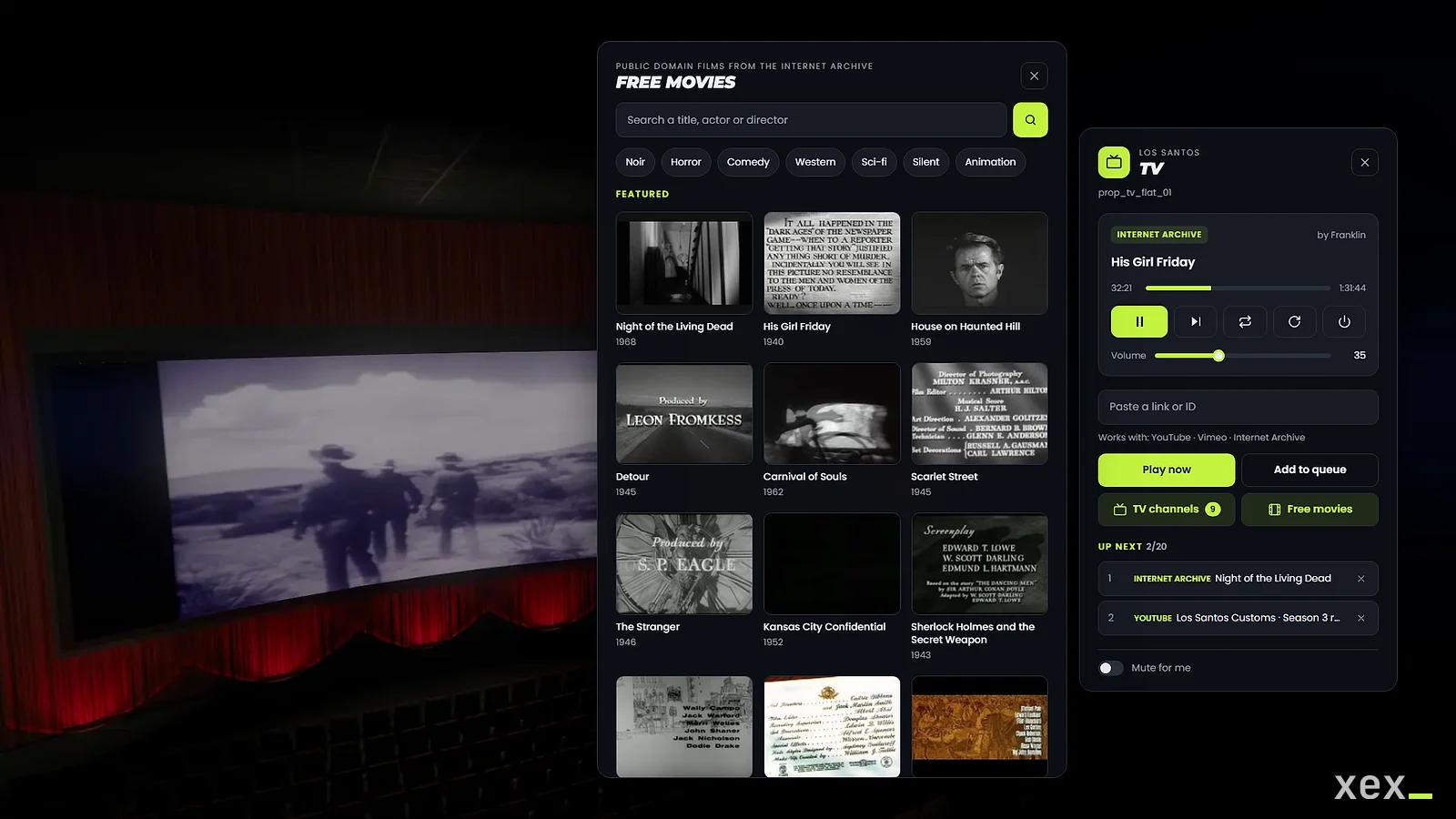
Synced TVs for FiveM. Walk up to any TV, open the remote and put on a live TV channel, a film, a YouTube or Vimeo link. Everyone nearby sees and hears the same second, including players who arrive late.
Standalone on ox_lib. ESX, QBCore and Qbox are only used to lock screens to jobs.
Made by XeX. Screenshots and the rest of my scripts are on xexstudio.com.
Features
- Live TV: 15 channels come configured (news, sports, music, space and nature, classic films and cartoons), from the broadcasters’ own free streams and YouTube channels. Channel guide with categories, and channel up / down.
- Channels keep themselves on air: every source can have backups, live sources are checked every few minutes and a YouTube channel’s channel always follows its current live stream.
- Movie library in the remote: thousands of public domain films from the Internet Archive, with featured picks, search and genres.
- YouTube (videos, shorts, live and a channel’s current live stream), Vimeo and video files or streams from hosts you allow. Links are checked on the server before they play.
- Queue, loop, seek and resync. The queue keeps going with nobody watching.
- Fixed screens on map props or spawned props, with autoplay and locks by ACE or by job and grade.
- Volume fades with distance and through walls. Each player can mute screens for themselves.
- Only the closest screens are rendered (3 by default). Screens nobody is near cost nothing.
- ox_target or qb-target, a command and an optional key.
- English and Spanish.
Requirements
- ox_lib
- Optional: ox_target or qb-target, and ESX, QBCore or Qbox for job locks
Install
- Put
xex_tvin your resources folder. - Add it to
server.cfgafter ox_lib (and after your framework if you use job locks):ensure xex_tv - The language follows ox_lib:
setr ox:locale enores.
Configuration
Everything is in config.lua, with a comment on each option.
| Section | |
|---|---|
Config.UI |
Brand name, title and accent colour of the remote |
Config.Interaction |
Command, target, key, help text and distances |
Config.Permissions |
Optional ACE to use screens, and the admin ACE |
Config.Sources |
YouTube and Vimeo on or off |
Config.AllowedMediaHosts |
Hosts players may paste video files and streams from. Empty means none |
Config.Library |
Library on or off, featured films and blocked films |
Config.Queue |
Queue on or off, and its size |
Config.Channels |
TV channels, their categories and sources |
Config.Playback |
Default volume, distance, walls, screens rendered at once and player URL |
Config.Locations |
Fixed screens |
Config.Models |
TV models and their render targets |
What players can paste
| Source | Example |
|---|---|
| YouTube | https://www.youtube.com/watch?v=…, youtu.be/…, /shorts/…, /live/… or the video id |
| A YouTube channel live | https://www.youtube.com/@channel/live or ytlive:@channel |
| Vimeo | https://vimeo.com/<id>, https://vimeo.com/<id>/<hash> (unlisted) or vimeo:<id> |
| Library | https://archive.org/details/<id> or archive:<id> |
| Video file or stream | https://<allowed host>/file.mp4 or https://<allowed host>/live.m3u8 |
Seek and the automatic “next” of the queue need the length of the video, which YouTube, Vimeo, the library and video files give. A live stream plays until someone puts on something else or turns the screen off; after a pause it resumes at the live moment, like a TV.
Some YouTube and Vimeo videos only play on the websites their owner chooses. Vimeo says so before playing; YouTube
doesn’t always, and the screen shows YOUTUBE_150 and explains it.
Movie library
The films come from the Internet Archive’s feature_films collection. Only uploads marked as public domain are listed,
which leaves out most copies of films still under copyright, and adult titles are filtered out. Links pasted by hand
follow the same rules.
The archive is user uploaded. If you see a film you don’t want, add its id to Config.Library.blocked. Players stream
the films from archive.org, so archive.org sees their IP, as YouTube does.
Channels
Channels are what the remote’s channel guide lists, grouped by category, with channel up / down while you watch one. They start with the resource and keep playing whether anyone watches or not, so every screen on a channel shows the same moment.
Config.Channels = {
    enabled = true,
    checkInterval = 180, -- seconds between checks of a live source
    list = {
        {
            id = 'news', label = 'France 24', category = 'news',
            sources = {
                'https://live.france24.com/hls/live/2037218/F24_EN_HI_HLS/master_2300.m3u8', -- live TV stream
                'ytlive:@France24_en', -- backup: whatever the YouTube channel is airing live
            },
        },
        { id = 'noir', label = 'Noir', category = 'movies', shuffle = true, sources = { 'archive:Detour', 'archive:ScarletStreet' } },
    },
}
Sources play in order. A live source plays until it fails; then the next one takes over, so put backups after it.
Videos and films play one after another (with shuffle the order changes every round). The server checks live
sources every checkInterval seconds, follows a YouTube channel to its new stream when it starts another one, and
skips a source that stops answering for 10 minutes. When players near a screen report that a channel can’t play
(two players, or one who can control the screen), the channel moves to its next source too.
Categories: news, sports, music, movies, kids, nature, documentary and entertainment are translated;
any other word is shown as it is.
The channels that come configured use the broadcasters’ own free streams and YouTube channels. Broadcasters move or
geo-block their streams now and then: a source that fails is printed to the console. A live TV stream (.m3u8) only
plays if its host allows browsers to read it (CORS); the server checks that before using it. Commented examples of
Spanish-language channels are at the end of the list.
A screen on a channel can’t be paused, seeked or queued: players change the channel or put on something else.
Archive.org items in the config don’t have to be part of the movie library (the configured cartoons aren’t). Players can only paste films of the library.
Fixed screens
Config.Locations = {
    {
        label = 'Vinewood cinema',
        model = 'v_ilev_cin_screen',
        coords = vec3(-1426.3, -248.1, 23.3),
        spawn = false, -- true: the resource places the prop (set heading too)
        autoplay = 'channel:horror', -- a channel, a film ('archive:<id>') or a link
        volume = 40,
        loop = true,
        locked = { ace = 'xex_tv.cinema', jobs = { cinema = 0 } }, -- job = minimum grade
    },
}
Anyone can watch a locked screen. Only the ACE, the listed jobs and xex_tv.admin can change it. For map props,
coords must be within 0.75 m of the prop: stand next to it and use the coordinates /tvdebug shows.
Permissions
# Only if Config.Permissions.ace = 'xex_tv.use'
add_ace group.vip xex_tv.use allow
# Every screen, locked ones included
add_ace group.admin xex_tv.admin allow
Known limits
- TVs of models that share a render target (most of them use
tvscreen) can’t show different things side by side: only the closest one of each render target is drawn. - Some YouTube videos only play on the websites their owner allows (
YOUTUBE_150); the same goes for Vimeo. - Live streams are watched from the live moment, so two screens on the same stream can be a few seconds apart.
- Some broadcasters only show their stream in some countries. Each player watches from their own connection.
- A screen paused for an hour is turned off.
YouTube error 153
If YouTube refuses to play in the game browser on your server (YOUTUBE_153), host ui/player/ and ui/fonts/ on
your own HTTPS domain, keeping both folders side by side, and set:
Config.Playback.playerUrl = 'https://tv.example.com/player/player.html'Exports
-- server
local screenId = exports.xex_tv:playAtCoords(vec3(100.0, 200.0, 30.0), `prop_tv_flat_01`, 'channel:noir', {
    volume = 25, bucket = 0,
})
exports.xex_tv:queue(screenId, 'archive:his_girl_friday')
local screen = exports.xex_tv:getScreen(screenId)
exports.xex_tv:stop(screenId)

-- client: open the remote for the closest TV
exports.xex_tv:open()
playAtCoords also takes offset (seconds) and loop. It returns the screen id straight away and the screen starts
once the link is checked, usually within a second. queue works the same way. Rejected links are printed to the
server console.
Security
Players only send requests. The server checks the TV model, the player’s distance and bucket, permissions and a cooldown, parses every link itself and builds the archive.org URLs. Video files and streams that players paste are only accepted from the hosts you list, because every player connects to them and the host sees their IP. Channels and fixed screens use the sources you wrote in the config.
License
MIT. Use it, change it and share it; keep the copyright notice. See LICENSE.
Live streams are played with hls.js (Apache 2.0), included in
ui/player/vendor with its license.