Script docs
Blips Menu
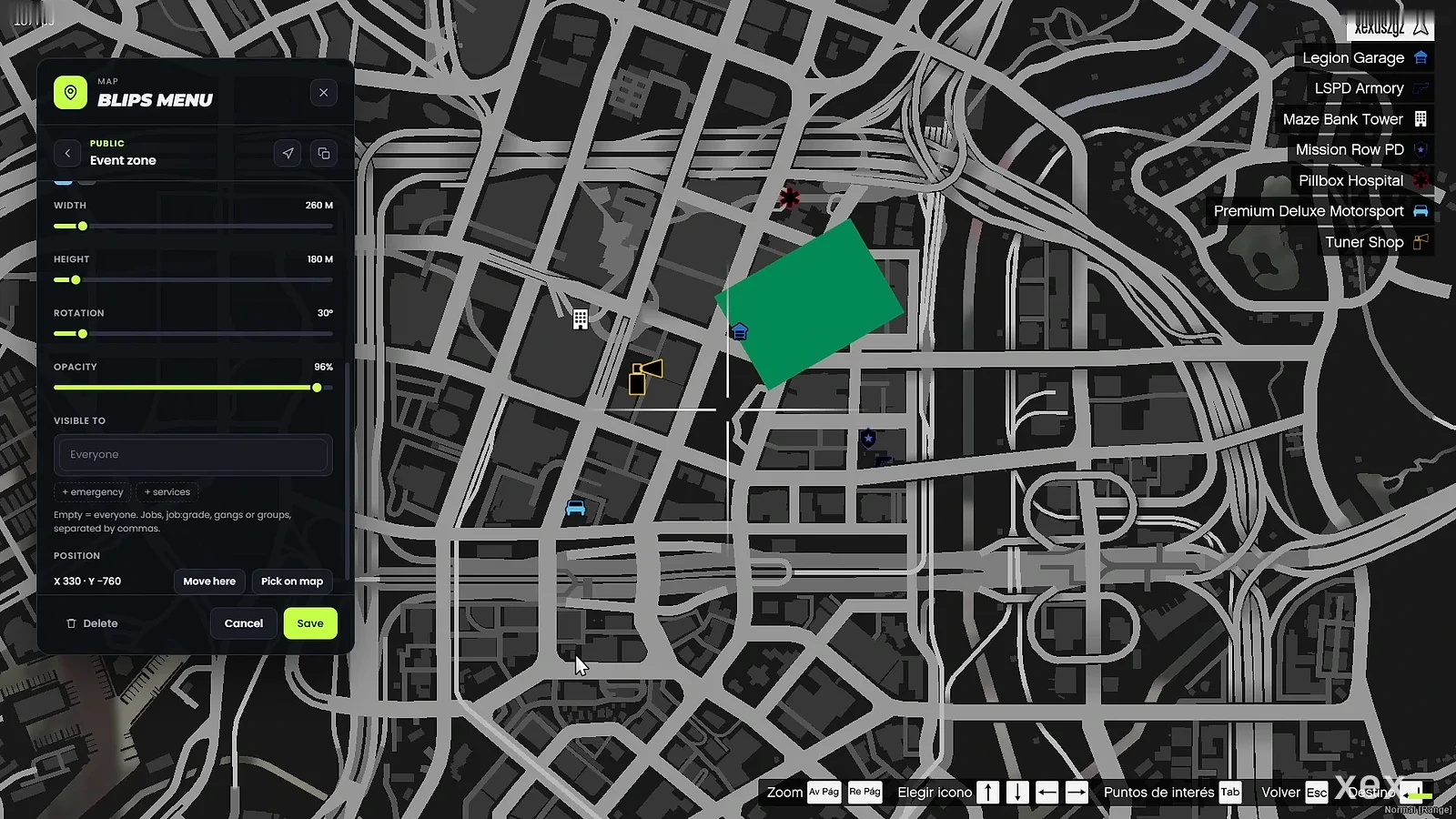
Create, edit and share map blips from the pause map, public or private.
- Version
- v2.0.0
- Frameworks
- ESX · QBCore · Qbox
- Requires
- ox_lib, oxmysql
- Source
- Escrow
- resmon
- 0.00 ms idle · 0.00 ms menu open
- Updated
- 6 Oct 2026
Create, edit and share map blips from the pause map. Admins manage public blips (optionally limited to jobs, grades or gangs); players keep their own private blips. ESX, QBCore and Qbox. Every change is validated on the server.
Requirements
Install
- Drop
xex_blipsmenuinto your resources folder. - Add to
server.cfgafter your framework, ox_lib and oxmysql:ensure xex_blipsmenu - Set the language with
setr ox:locale en(ores). - Optional Discord logs (server only, never sent to players):
set xex_blipsmenu_webhook "https://discord.com/api/webhooks/..."
The user_blips table is created on the first start (install/blips.sql if you prefer to run it yourself).
Updating from v1
- Keep your
user_blipstable: every blip is kept. Theblipdatacolumn is widened automatically. - Remove
mysql-asyncfrom the manifest if you added it; v2 uses oxmysql. Config.Framework,Config.AdminRolesand the webhook settings changed: copy your values into the newconfig.lua.- Move your webhook to the
xex_blipsmenu_webhookconvar. In v1 it lived inconfig.lua, which players can download.
How to use
Open the pause map and press SPACE (players can rebind it in Settings > Key Bindings > FiveM), or type /blips.
- Create a blip on the map, at your position or by coordinates.
- Edit type (icon, area or radius), name, icon, colour, size, rotation, opacity, map/minimap display, short range, outline and tick. Every change previews live on the map and is only stored when you save.
- Visible to (public blips): leave empty for everyone, or add jobs (
police), minimum grades (police:2), gangs on QBCore/Qbox (ballas) or groups fromConfig.JobGroups. - Set a waypoint to any blip, duplicate it or move it.
Configure
Everything lives in config.lua:
| Setting | What it does |
|---|---|
Config.Framework |
auto, or force esx / qb / qbox |
Config.Key, Config.Command, Config.MapHint |
How the menu opens and the hint on the pause map |
Config.Admin |
Groups and ace that manage public blips |
Config.PrivateBlips |
Turn private blips on or off and limit how many each character has |
Config.JobGroups |
Shortcuts for the “Visible to” field: a list of jobs or a server function |
Config.UI |
Brand, title and accent colour of the menu |
Config.Defaults |
Name, icon, colour and size of new blips |
Config.Logs |
Discord log name and whether private blips are logged |
A group can be a function for custom job systems:
Config.JobGroups = {
    gangs = function(job, source) return job:find('^gang') ~= nil end,
}
For developers
-- server
local id = exports.xex_blipsmenu:AddPublicBlip(vec3(215.0, -810.0, 30.0), { title = 'Event', sprite = 280, colour = 5 })
exports.xex_blipsmenu:UpdatePublicBlip(id, { colour = 1 })
exports.xex_blipsmenu:RemovePublicBlip(id)
local blips = exports.xex_blipsmenu:GetPublicBlips()

AddEventHandler('xex_blipsmenu:changed', function(action, blip, source)
    -- action: 'created' | 'updated' | 'removed'
end)
bridge/server.lua and bridge/client.lua are open: adapt them for a custom framework, permission or job system.
Security
- Only admins can create, edit or remove public blips; only the owner can touch a private blip. Checked on the server.
- Names, colours, sizes and job lists are cleaned and limited on the server before they are stored or shared.
- Players only receive the public blips they are allowed to see: restricted blips never reach other clients.
- Private blips per character are limited, and changes are rate limited.
- The Discord webhook is read from a server convar and is never sent to players.